New generation · No kernel extension · Native on Apple silicon and Intel

Windows, Linux and NAS drives,
open right on your Mac

CrossDriver is a set of Mac disk tools: NTFS external drives and USB sticks, Raspberry Pi Ext4 cards, XFS server disks, and drives from a dead NAS all open on your Mac like ordinary disks — and deleted or formatted files on USB sticks, SD cards and external drives can be recovered. See your files for free first, then decide whether to upgrade.

No kernel extensionNo security downgradeNo restartFree browsing & preview

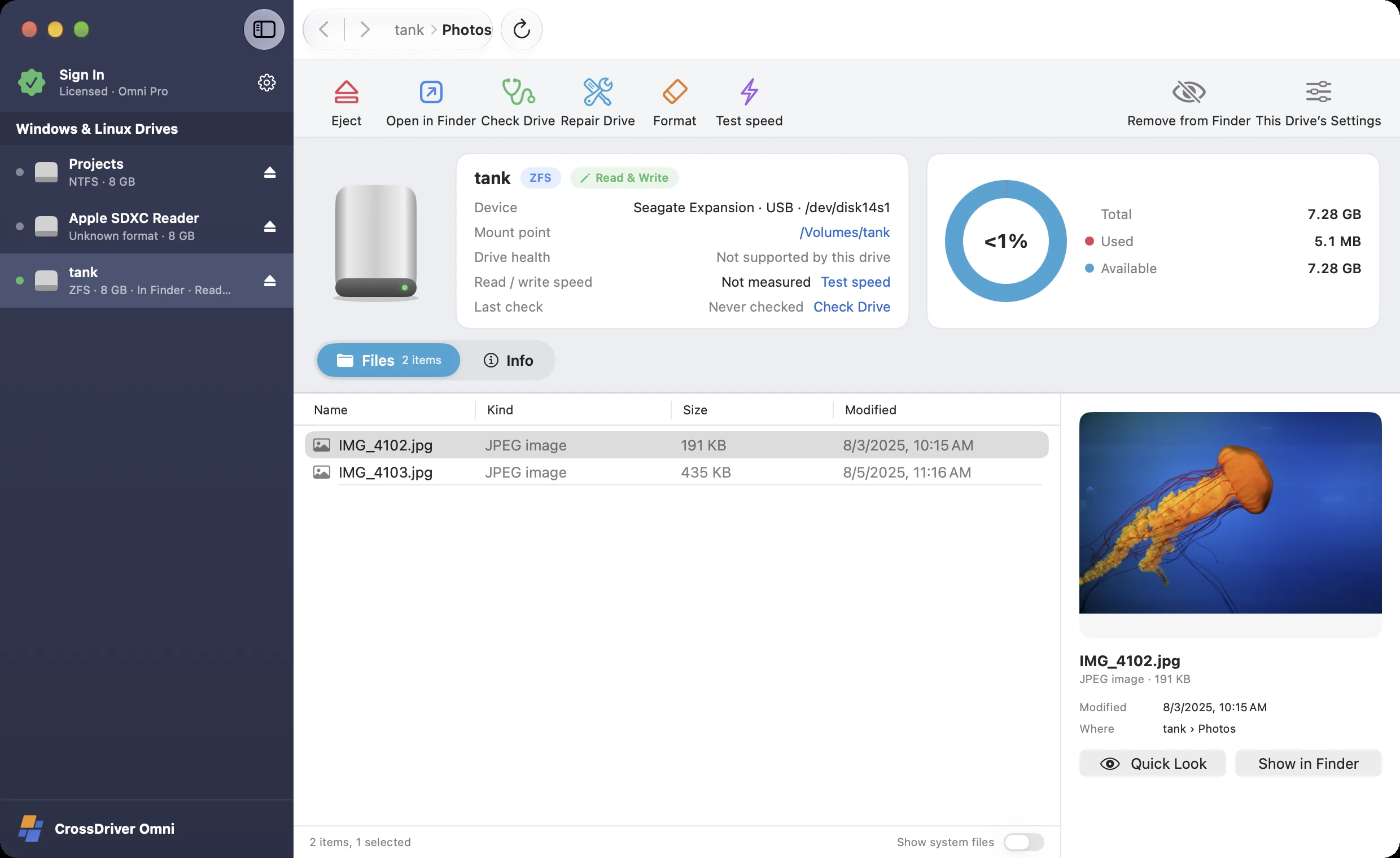
CrossDriver Omni (NTFS / Ext4 / XFS / Btrfs / ZFS for Mac) screenshot: Windows and Linux drives in one sidebar; Read & write; Open in Finder with one click; Preview photos, videos & documents
1Windows and Linux drives in one sidebar
2Read & write
3Open in Finder with one click
4Preview photos, videos & documents
Windows edition · Five apps · x64 and ARM64 supported

Mac, Linux and NAS drives —
plug them into a Windows PC and open them

CrossDriver for Windows is five apps: Mac APFS external drives and Time Machine backup drives, Raspberry Pi Ext4 cards and XFS or Btrfs server drives all open in File Explorer like any other drive; files deleted or formatted away on USB drives, SD cards and external drives, and the drives of a broken NAS, can be recovered read-only. See your files free first, then decide whether to upgrade.

No kernel driverWorks on Windows 10 / 11 HomeFree browsing & preview

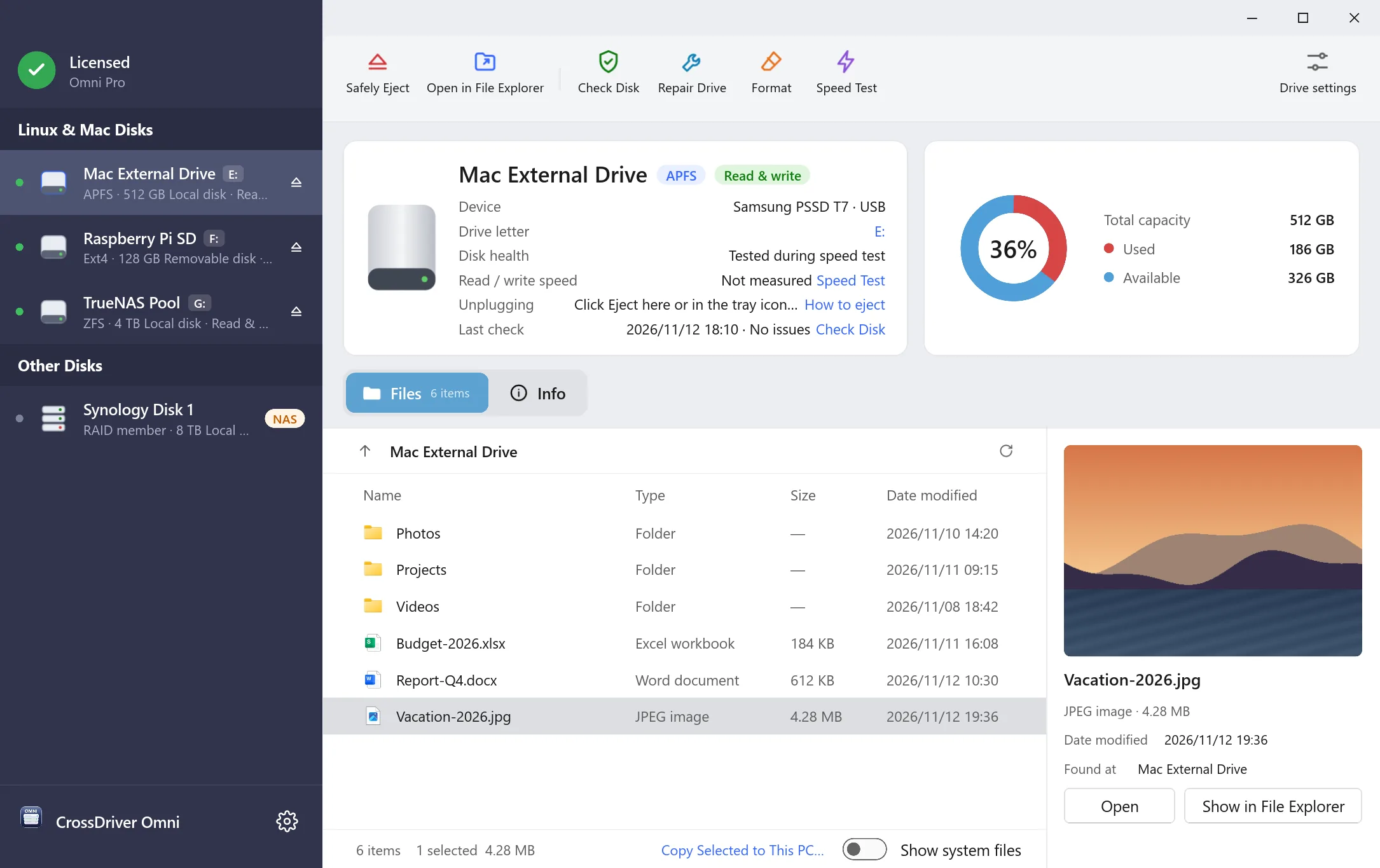
CrossDriver Omni (APFS, Ext4, XFS, Btrfs, ZFS for Windows) screenshot: Mac drives and Linux drives grouped; Drive letters in File Explorer; NAS member drives go to Data Recovery NAS; Instant preview
1Mac drives and Linux drives grouped
2Drive letters in File Explorer
3NAS member drives go to Data Recovery NAS
4Instant preview
Performance

Performance testing in progress

We're testing a traditional user-space tool, CrossDriver New Generation and the Kernel Edition on real Macs and disks. Once testing is complete, we'll publish the data, methodology and raw results here; until then, we won't quote any speed multiples.

Compare

Which one should I choose?

Only use one format? Get that edition. Run into several? Get Omni. NAS died? Get Data Recovery NAS. Deleted or formatted a USB stick or SD card? Get Data Recovery.

NTFSExt4XFSOmniData Recovery NASData Recovery
Read & write NTFS (Windows)✓——✓——
Read & write Ext2 / Ext3 / Ext4—✓—✓Read-only—
Read & write XFS——✓✓Read-only—
Read & write Btrfs, F2FS———✓Btrfs read-only—
Read & write ZFS———✓Read-only—
FormatNTFSExt4XFSNTFS · Ext4 · XFS · Btrfs · ZFS · F2FS——
Check & repair file systems✓✓✓✓Diagnostics · btrfs restoreDiagnostics
Unlock encrypted disksBitLockerLUKSLUKSBitLocker · LUKS · ZFSLUKS · BitLocker · ZFSLUKS · BitLocker
Recover deleted & formatted files————✓✓
Recover lost partitions————✓✓
Rebuild NAS RAID / LVM / ZFS————✓—
Image failing disks, verified recovery————✓✓
Writes to your diskRead & writeRead & writeRead & writeRead & writeStrictly read-onlyStrictly read-only

Every edition's free version lets you browse and preview files. The free versions of NTFS, Ext4, XFS and Omni also give read-only access in Finder, and Pro comes with a free 7-day trial.

Works with

Works with mainstream Macs and drives of every brand

Supported Macs

Models
MacBook Air, MacBook Pro, iMac, Mac mini, Mac Studio, Mac Pro
Chip
Apple silicon (the entire M1–M6 families, including Pro, Max and Ultra) and Intel processors
System
macOS 12 Monterey, 13 Ventura, 14 Sonoma, 15 Sequoia, 26 Tahoe and later

Supported disks

Type
External hard drives, portable SSDs, USB flash drives, SD / microSD cards, SATA / NVMe drives in an enclosure or dock, and drives pulled from a NAS
Connection
USB-A, USB-C, Thunderbolt, card readers, drive enclosures, drive docks
Brands
Works with every brand, such as Seagate, WD (Western Digital), Toshiba, Samsung T7 / T9, SanDisk, Kingston, Lexar, LaCie, UGREEN, ORICO and more

Common uses

Windows external drives
Moving files between Windows PCs at work and at home
Linux & Raspberry Pi
Raspberry Pi SD cards, drives from Linux PCs and servers
Video & large files
Editing media drives, camera and drone footage backups
NAS failure
Synology, QNAP or other NAS died? Pull the drives and get your files back

Any brand, any capacity: if the format matches, it opens.

Next-gen engine

No kernel extensions.
No changes to your Mac's security settings.

The new CrossDriver reads and writes NTFS, Ext4, XFS and other disks with native Linux file system drivers, running inside an isolated, lightweight Linux environment. Your Mac stays at its factory security level.

✓ No kernel extension

Works right after install

No Recovery mode, no lowering security, no restart — and no broken drivers after a macOS update.

✓ Isolated

A dedicated engine for your disk

The engine only sees the disk you open, fully isolated from macOS and your other disks.

✓ Safe eject

Everything's written before you unplug

When you click "Eject", the engine writes all changes back to the disk before releasing it, so unplugging won't lose data.

All editions require macOS 12 or later and run natively on Apple silicon and Intel.

Kernel Edition users

Already using CrossDriver Kernel Edition?

ⓘ

Kernel Edition and the new generation — both generations remain available

On crossdriver.com, NTFS For Mac, Ext4 For MAC and XFS For MAC are the Kernel Edition: they run as kernel extensions, but require lowering system security on Apple silicon Macs. The new generation is built on an all-new virtualization engine: no kernel extension, reading and writing through the Linux kernel's own drivers, plus free preview; Pro adds repair, formatting and encrypted-disk unlocking. Both share the same license and work on the same Mac. Want maximum speed? Choose the Kernel Edition. Want hassle-free? Choose the new generation.

FAQ

Q&A

Which one should I download?

It depends on the disk’s format: external drives and USB flash drives used with Windows are usually NTFS; Linux and Raspberry Pi usually use Ext4; servers and Unraid often use XFS. Not sure? Choose Omni — it opens them all. NAS won’t boot? Choose Data Recovery NAS. Deleted files or formatted a disk by mistake? Choose Data Recovery.

What can the free version do?

Every app has a free version with no time limit. NTFS, Ext4, XFS and Omni: detect and open disks automatically, browse every folder in Finder, preview photos, videos and documents, copy files to your Mac, and also check disks; writing, repair, formatting and unlocking encrypted drives are Pro, with a 7-day free trial first. Data Recovery: scanning, finding partitions, browsing and previewing every file found are all free, and you can recover 500 MB free (2 GB after sharing). Data Recovery NAS: detect your NAS and rebuild the storage pool for free, browse every folder and snapshot and preview files to confirm they're all there, then upgrade to Pro to recover.

Why can't my Mac copy files to my external drive?

Most likely because the drive uses NTFS, the format Windows commonly uses: macOS can read NTFS but can't write to it, so in Finder you can't drag files in, delete or rename. Install CrossDriver NTFS to write directly in Finder. For the causes and other fixes, see Mac can't write to an NTFS external drive? Here's what to do.

Can I read drives pulled from a Synology or QNAP NAS on my Mac?

Not by simply plugging them in: NAS data usually sits on top of RAID / SHR and LVM, and macOS will say "The disk you attached was not readable by this computer." Click "Ignore" — don't initialize it. Connect all the drives from the same storage pool and use Data Recovery NAS to rebuild the array read-only, then browse and preview for free. For the steps, see Reading Synology drives on a Mac.

Which Macs are supported? Does it work on a MacBook Air or an M4 Mac mini?

Every Mac that runs macOS 12 or later is supported: MacBook Air, MacBook Pro, iMac, Mac mini, Mac Studio and Mac Pro. Apple silicon (the entire M1–M6 families, including Pro, Max and Ultra) and Intel processors are supported natively, on macOS 12 Monterey, 13 Ventura, 14 Sonoma, 15 Sequoia, 26 Tahoe and later.

Does it work on M1–M6 Macs? Do I need to disable SIP or install a kernel extension?

Yes, it works — and no, you don't. CrossDriver runs natively on Apple silicon Macs such as M1–M6 as well as Intel Macs, on macOS 12 Monterey, 13 Ventura, 14 Sonoma, 15 Sequoia, 26 Tahoe and later. It uses macOS's built-in virtualization framework to run an isolated, lightweight engine that reads and writes your disks — no kernel extension, no disabling SIP, no changes to any security settings, and no restart after installing.

Can I try Pro first?

Yes. CrossDriver NTFS, Ext4, XFS and Omni all offer a free 7-day Pro trial in the app — once per Mac, no payment details required. After the trial ends, your disks remain accessible read-only and your files are unaffected.

Compare

Which one should I choose?

Only Mac drives or only Linux drives: pick the matching app. Both: pick Omni. Files deleted or a USB drive or SD card formatted: pick Data Recovery. A broken NAS: pick Data Recovery NAS.

for Mac Disksfor Linux DisksOmniData RecoveryData Recovery NAS
APFS, HFS+ (Mac)Read & write · writing is experimental—Read & write · writing is experimentalOpen read-onlyOpen read-only
Time Machine backupsBrowse by point in time—Browse by point in time——
Ext4, XFS, Btrfs (Linux)—✓✓Open read-onlyOpen read-only
ZFS, F2FS——✓Open read-onlyOpen read-only
Unlock encrypted disksEncrypted APFSLUKSEncrypted APFS · LUKSLUKS · BitLockerLUKS · BitLocker · ZFS
Check & repair—Ext4 · XFSExt4 · XFSDiagnosticsDiagnostics
FormatAPFS · HFS+ · exFATExt4 · XFS · Btrfs · exFATCommon Mac and Linux formats——
Undelete, deep scan after formatting———✓✓
Recover lost partitions———✓✓
Rebuild NAS RAID / LVM / ZFS————✓
Writes to your diskRead & writeRead & writeRead & writeStrictly read-onlyStrictly read-only
Pro license also unlocks——for Mac Disks · for Linux Disks—Data Recovery

Windows reads and writes NTFS, FAT32 and exFAT itself, so the CrossDriver disk apps leave them alone; Data Recovery can scan drives in these formats. The free edition of every app can browse and preview files.

Experience

Several apps, one engine

01Tray

App closed, drive still there

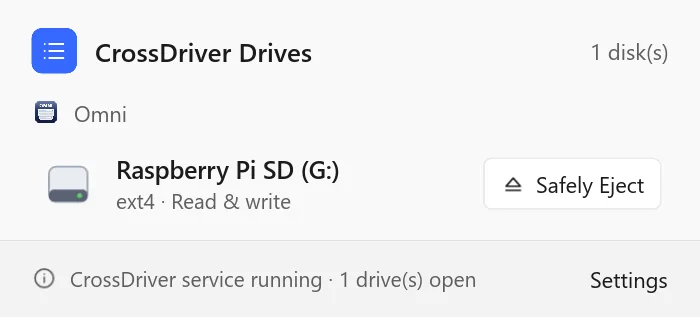
The CrossDriver tray helper starts when you sign in. After you close an app, the drives it opened stay available through the background service and keep their drive letters; every CrossDriver drive and running task is listed in the tray menu, where you can safely eject them.

  • All CrossDriver drives at a glance
  • App closed, drive still available
  • One place to safely eject
  • Tells you when it's safe to unplug after writing back changes
CrossDriver Omni (APFS, Ext4, XFS, Btrfs, ZFS for Windows) screenshot: All CrossDriver drives at a glance; App closed, drive still available; One place to safely eject
1All CrossDriver drives at a glance
2App closed, drive still available
3One place to safely eject
02Teamwork

Several apps work together without fighting over a drive

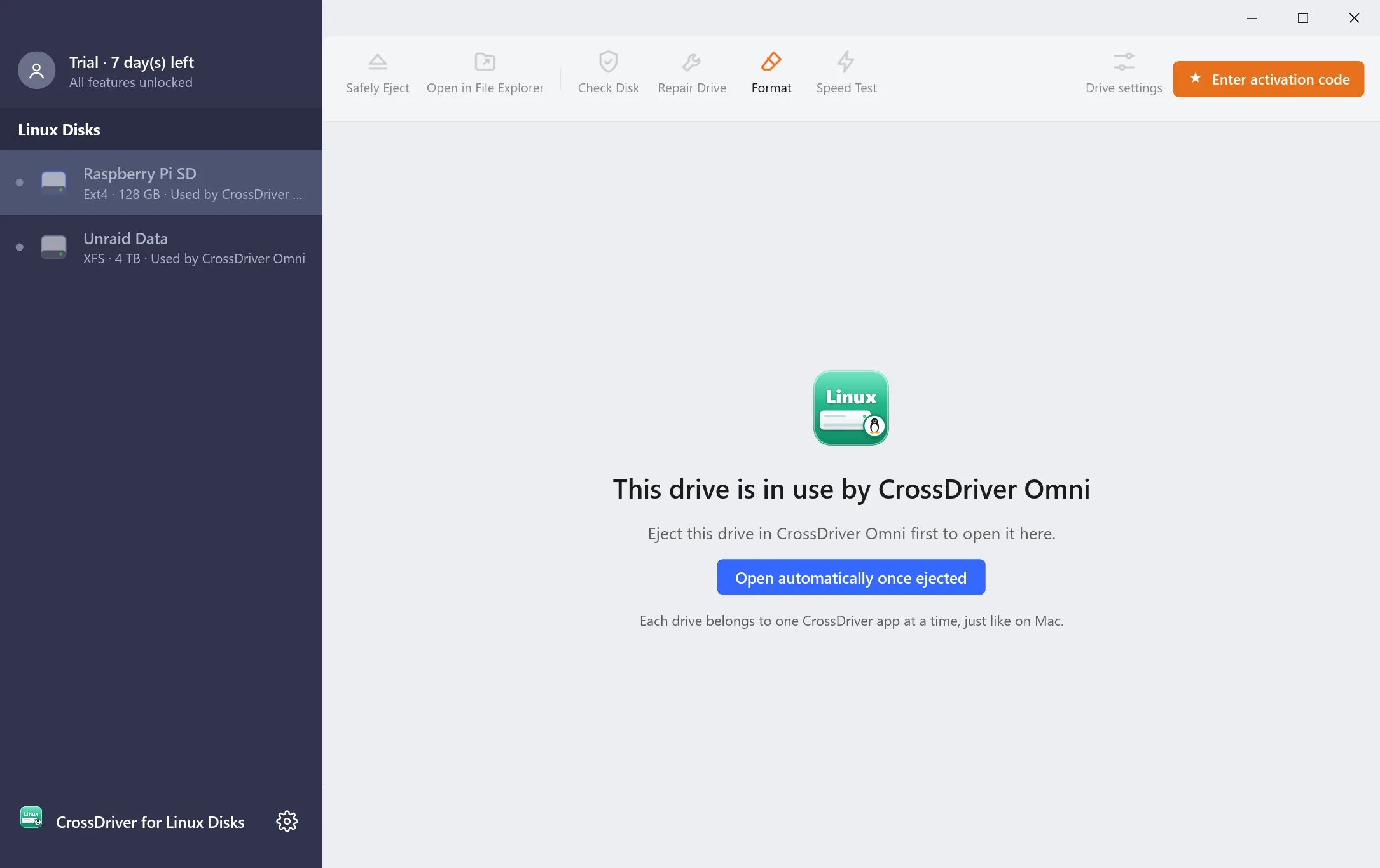
However many CrossDriver apps you install, they never fight over a drive: when one app has a drive open, the others show who is using it, and you can jump there to view it or ask for a handover. Data Recovery keeps a drive to itself while scanning, because the data must not change.

  • 1Shows which app is using it
  • 2One drive, one app
  • 3Open automatically once ejected there, or hand over after the scan
CrossDriver Omni (APFS, Ext4, XFS, Btrfs, ZFS for Windows) screenshot: Shows which app is using it; One drive, one app; Open automatically once ejected
1Shows which app is using it
2One drive, one app
3Open automatically once ejected
03Environment

Smart checks, automatic fixes

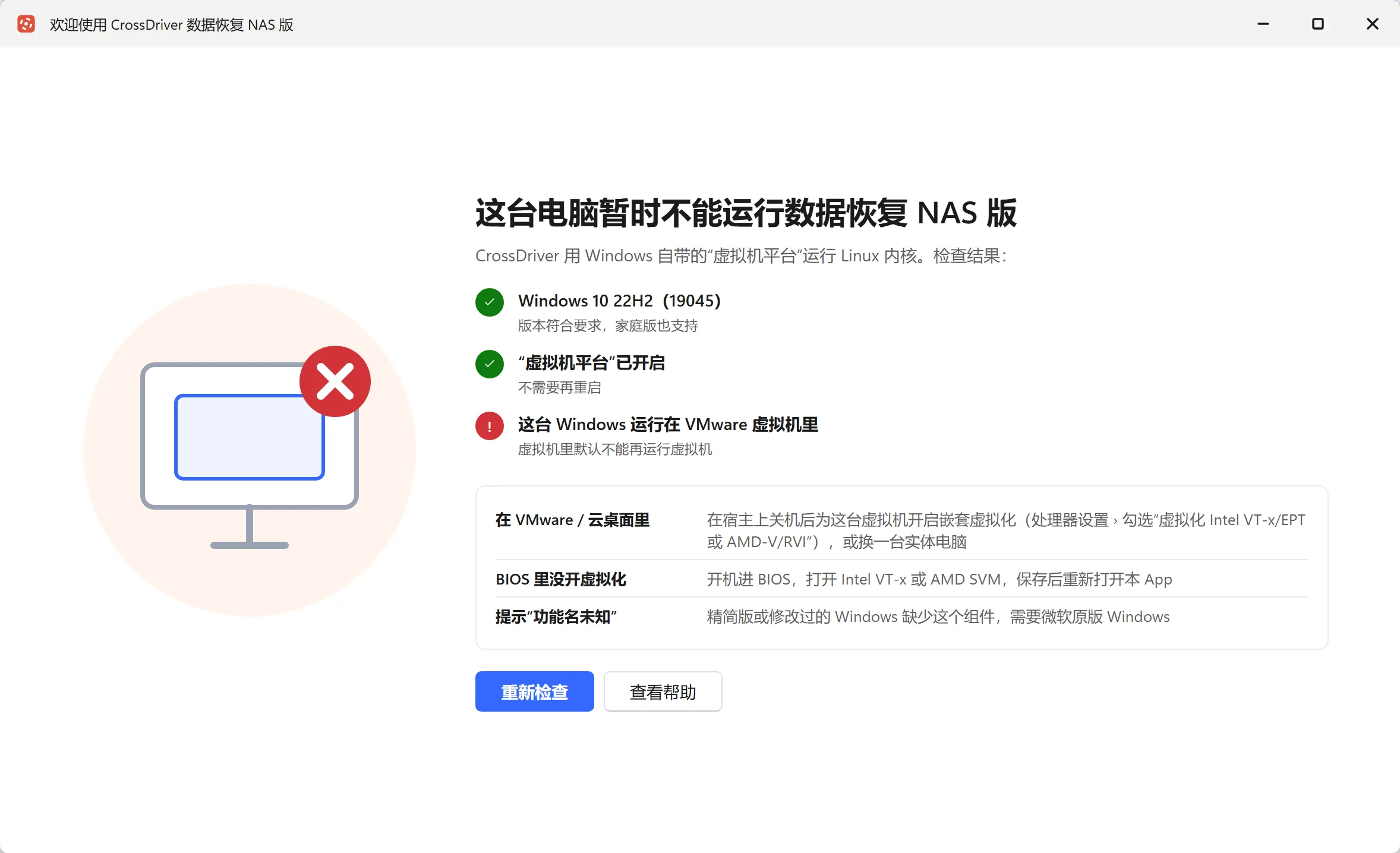
At install and first launch, it automatically checks the Windows version, Virtual Machine Platform and virtualization. If Virtual Machine Platform is off, the installer turns it on for you and one restart is all it takes; for special setups such as VMware or a cloud desktop, virtualization turned off in the BIOS, or a stripped-down Windows, it gives a solution for each case.

  • 1Automatically checks the Windows version and Virtual Machine Platform
  • 2Pinpoints environment problems
  • 3A solution for every case
CrossDriver for Windows interface mockup: Automatically checks Virtual Machine Platform; Pinpoints environment problems; A solution for every case
1Automatically checks Virtual Machine Platform
2Pinpoints environment problems
3A solution for every case
Mockup
How it works

No kernel driver:
Windows' own Virtual Machine Platform

CrossDriver reads and writes Mac and Linux drives with native Linux file system drivers inside an isolated, lightweight Linux virtual machine, then hands the volumes to File Explorer as drive letters. The virtual machine runs on Windows' built-in Virtual Machine Platform; no kernel driver is installed.

✓ No kernel driver

A built-in Windows component

Just turn on Windows' built-in Virtual Machine Platform and restart once the first time. Windows Home has it too.

✓ One engine

One virtual machine, however many apps

All five apps share one background service and one virtual machine: no fighting over drives and resources used only once. When no drive needs serving, the virtual machine stops by itself.

✓ Safe eject

Everything's written before you unplug

Click "Safely eject" in the app or the taskbar tray: the engine first writes every change back to the disk, then tells you it's safe to unplug.

Requirements: Windows 10 2004 (19041) or later, x64 and ARM64, virtualization enabled in the BIOS. When Windows itself runs in a virtual machine, nested virtualization must be turned on.

Tested on real PCs

Measured results

In November 2026, measured on 7 physical PCs and a range of mainstream drives (actual speeds vary by PC and drive):

7 PCs

All physical PCs passed

Windows 10 21H2 / 22H2 (Home, Pro, Education) and Windows 11, Intel 6th–13th gen and Ryzen 2500U–8840HS: engine start-up and drive attach passed on all of them.

About 90%

External SSDs close to native speed

A Samsung T7 handed straight to the engine reads 1 MiB blocks at 716 MiB/s; Windows natively reads 797 MiB/s.

USB flash drives

USB flash drives and card readers are supported too

USB flash drives attach through the engine's forwarding, and both read-only and read-write passed; a 117 GB USB flash drive reads sequentially at 140 MiB/s, limited by the drive itself.

About 1 GB/s

Large files on the drive letter

ZFS on a Samsung T9 through its drive letter, 4 GiB file: read 1092 MiB/s, write 1004 MiB/s.

System requirements

Works on mainstream Windows PCs

Each item below is checked automatically at install; if Virtual Machine Platform is off, it is turned on for you and one restart is all it takes.

System

Version
Windows 10 2004 (19041) or later, Windows 11
Edition
Home, Pro and Education all work
Processor
x64 (Intel, AMD) and ARM64, one installer

Virtualization

Virtual Machine Platform
A built-in Windows component; restart once after turning it on the first time
BIOS
Intel VT-x or AMD SVM enabled (on by default on most PCs)
Kernel driver
Not required

Special setups

Virtual machines, cloud desktops
Works once nested virtualization is turned on
Stripped-down Windows
If the Virtual Machine Platform component is missing (error 0x800F080C), use genuine Microsoft Windows
Virtualization off in the BIOS
Turn on Intel VT-x or AMD SVM in the BIOS and you're set

See Turn on Virtual Machine Platform.

Our promise

Your files stay on your PC

0

bytes uploaded

File names, paths and contents never leave your PC, and everything works offline.

0

bytes written to the source disk

Data Recovery and the NAS edition are strictly read-only: the disk is handed to the engine read-only, and recovered files are written to another disk of your choice.

✓

You decide about writing

The free disk apps are read-only; APFS writing is an experimental feature, off by default and turned on per drive in its settings.

✓

Clean uninstall

No kernel driver; uninstalling the last CrossDriver app removes the background service, the tray helper and the virtual machine image with it.

FAQ

Q&A

Which one should I download?

Look at where the drive came from: external drives used on a Mac are mostly APFS or HFS+, so pick for Mac Disks; drives from a Raspberry Pi, Linux PC or server are mostly Ext4, XFS or Btrfs, so pick for Linux Disks; if you meet both, pick Omni. Files deleted or a drive formatted: Data Recovery; a NAS that won't start: Data Recovery NAS.

Can Windows read a Mac external drive directly?

No. Windows doesn't understand APFS or HFS+ and will say the disk needs formatting — click "Cancel" and never format it. Install CrossDriver for Mac Disks and it appears in File Explorer with a drive letter.

What can the free version do?

Every app has a free version with no time limit. for Mac Disks, for Linux Disks and Omni: detect and open drives automatically, see them in File Explorer as drive letters, browse every folder, preview photos, videos and documents, copy files to your PC, and also browse Time Machine backups by point in time; writing, repair and formatting are Pro, with a 7-day free trial first. Data Recovery: scanning, finding partitions, browsing and previewing every file found are all free, and you can recover 500 MB free (2 GB after sharing). Data Recovery NAS: detect your NAS and rebuild the array for free, browse every folder and snapshot and preview files to confirm they're all there, then upgrade to Pro to recover.

What do I need to turn on? Do I need to restart?

Windows' built-in Virtual Machine Platform must be turned on, followed by one restart; after that no more restarts. The installer and the first-launch page check it and walk you through turning it on. Windows Home has this component too. Steps: Turn on Virtual Machine Platform.

Does it work in a VMware virtual machine or a cloud desktop?

When Windows itself runs in a virtual machine, by default it can't run another virtual machine, so CrossDriver can't run either. Shut the virtual machine down on the host and turn on nested virtualization for it (VMware: in the processor settings, tick "Virtualize Intel VT-x/EPT or AMD-V/RVI"); a cloud desktop needs a provider that supports nested virtualization. Our compatibility testing covers physical PCs only, so we recommend using a physical PC.

Turning on Virtual Machine Platform fails with 0x800F080C. What now?

0x800F080C means "Feature name is unknown": this PC runs a stripped-down or modified Windows that lacks the Virtual Machine Platform component, so CrossDriver can't run. You need genuine Microsoft Windows.

Are USB flash drives supported?

Yes. USB flash drives, SD card readers and some drive enclosures can't be handed straight to a virtual machine, so CrossDriver forwards them through the background service instead. Read-only and read-write have both been tested; speed mostly depends on the USB drive itself.

Do BitLocker-encrypted drives work?

BitLocker, like NTFS, FAT32 and exFAT, is handled by Windows itself, so everyday reading and writing doesn't need CrossDriver. Data Recovery and Data Recovery NAS can unlock BitLocker volumes read-only for a scan with the password, the 48-digit recovery key or a .BEK file.

Why is opening lots of small files in File Explorer a bit slow?

CrossDriver's drive letters appear as network locations, and Microsoft Defender real-time protection checks every file opened: measured at about 8 ms more per file, noticeable with many small files, while large files aren't affected. For sorting through many small files, use browsing and batch export in the app; we don't recommend turning off real-time protection for this.

I bought the Mac version. Do I need to buy the Windows version too?

Yes. Mac and Windows licenses are separate; a discounted bundle for both is coming soon.

Plug in your disk and take a look — free

Every edition is free to download and preview.

macOS 12 or later · Apple silicon & Intel · Privacy Policy · Pricing · Open-Source Licenses

Downloads are counted anonymously; no personal information is recorded.