CrossDriver Ext4New generation · Free version, no time limit · 7-day Pro trial

Ext4 Linux drives and Raspberry Pi SD cards,
read & write on your Mac

CrossDriver Ext4 for Mac lets your Mac read and mount ext4. macOS can't read Linux drives on its own; with it, Ext2, Ext3, and Ext4 disks and Raspberry Pi SD cards open in Finder as soon as you plug them in: edit config files, copy photos, back up projects. No kernel extension, no changes to your Mac's security settings.

No kernel extensionNo security downgradeNo restartFree browsing & preview

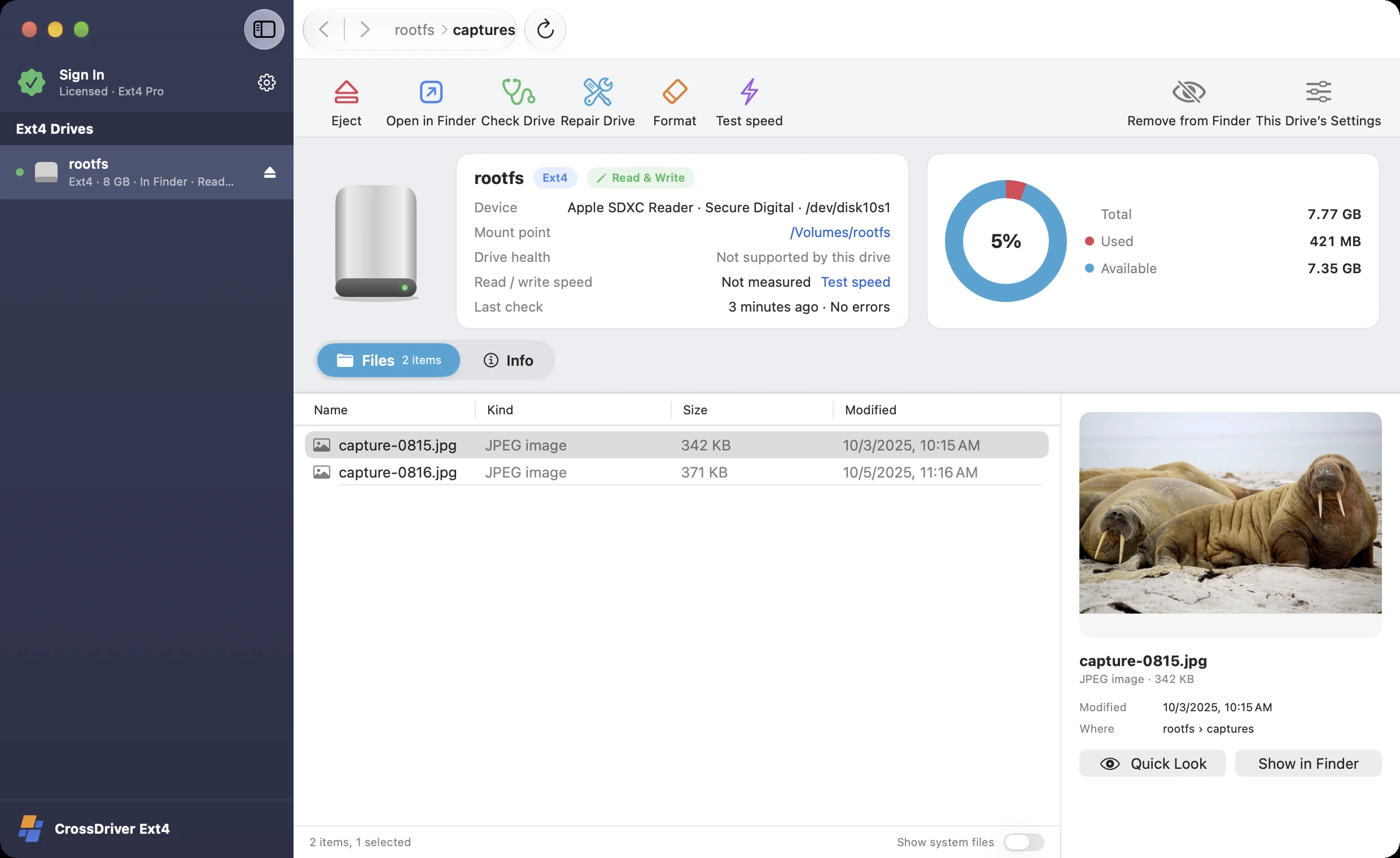
CrossDriver Ext4 (Ext4 for Mac (mount ext4 on macOS)) screenshot: Raspberry Pi SD cards appear when plugged in; Ext4 · Read & write; Open in Finder with one click; Preview photos, videos & text
1Raspberry Pi SD cards appear when plugged in
2Ext4 · Read & write
3Open in Finder with one click
4Preview photos, videos & text

Open all of these disks

Ext4Ext3Ext2Raspberry Pi SD cardsLinux external drivesLUKS-encrypted drives
Use cases

Plug these Ext4 disks into your Mac and go

Ext4 is the most widely used Linux file system. Ext2, Ext3 or Ext4 — whatever device it came from, it opens.

🍓

Raspberry Pi SD cards

Edit config.txt, copy camera footage, back up an entire project — no need to hunt down a Linux computer.

🔐

LUKS-encrypted external drives

External drives encrypted on Linux unlock and open on your Mac with your password.

🐧

Drives from Linux PCs

Drives pulled from old computers and Linux partitions from dual-boot setups — grab the files right on your Mac.

🗄

External NAS backup drives

Many NAS devices format USB backup drives as Ext4. Recover files on your Mac even when the NAS isn't around.

🛠

Dev boards & embedded devices

System and data disks from Jetson and other dev boards — edit files right on your Mac while debugging.

☁️

Server data drives

Ext4 data drives pulled from Linux servers — even files tens of GB in size copy at high speed.

01Pro

Edit your Raspberry Pi's config without a Linux computer

The SD card's Ext4 partition appears in Finder. Edit and save directly in your favorite editor.

  • 1Ext4 partitions appear in the Finder sidebar
  • 2Edit and save directly from any app
  • 3Read & write, with free space shown
1Appears in the Finder sidebar
2Edit and save directly from any app
3Read & write, with free space shown
02Free

Look first, for free — make sure your files are there

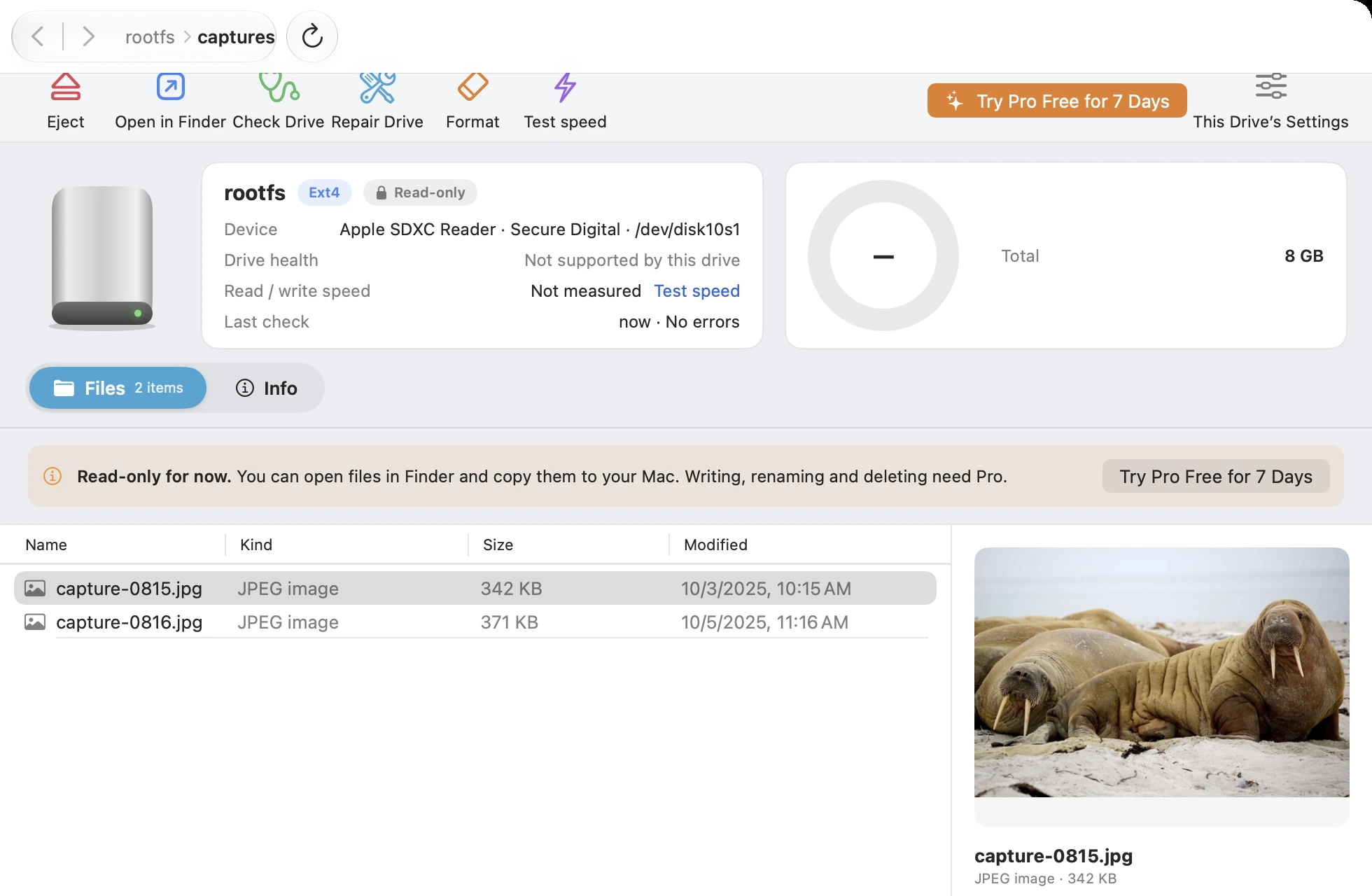
The free version opens Ext2/Ext3/Ext4 disks for read-only browsing in Finder and copying to your Mac, with built-in preview for photos, videos, documents and text.

  • 1The free version appears in Finder as read-only and never changes the disk
  • 2Select a file to preview it
  • 3Upgrade to Pro when you need to write — or try it free for 7 days first
CrossDriver Ext4 (Ext4 for Mac (mount ext4 on macOS)) screenshot: Free version: read-only; Free preview; Pro can write — try it free for 7 days
1Free version: read-only
2Free preview
3Pro can write — try it free for 7 days
03Repair

Raspberry Pi lost power suddenly? Check and repair before you use it

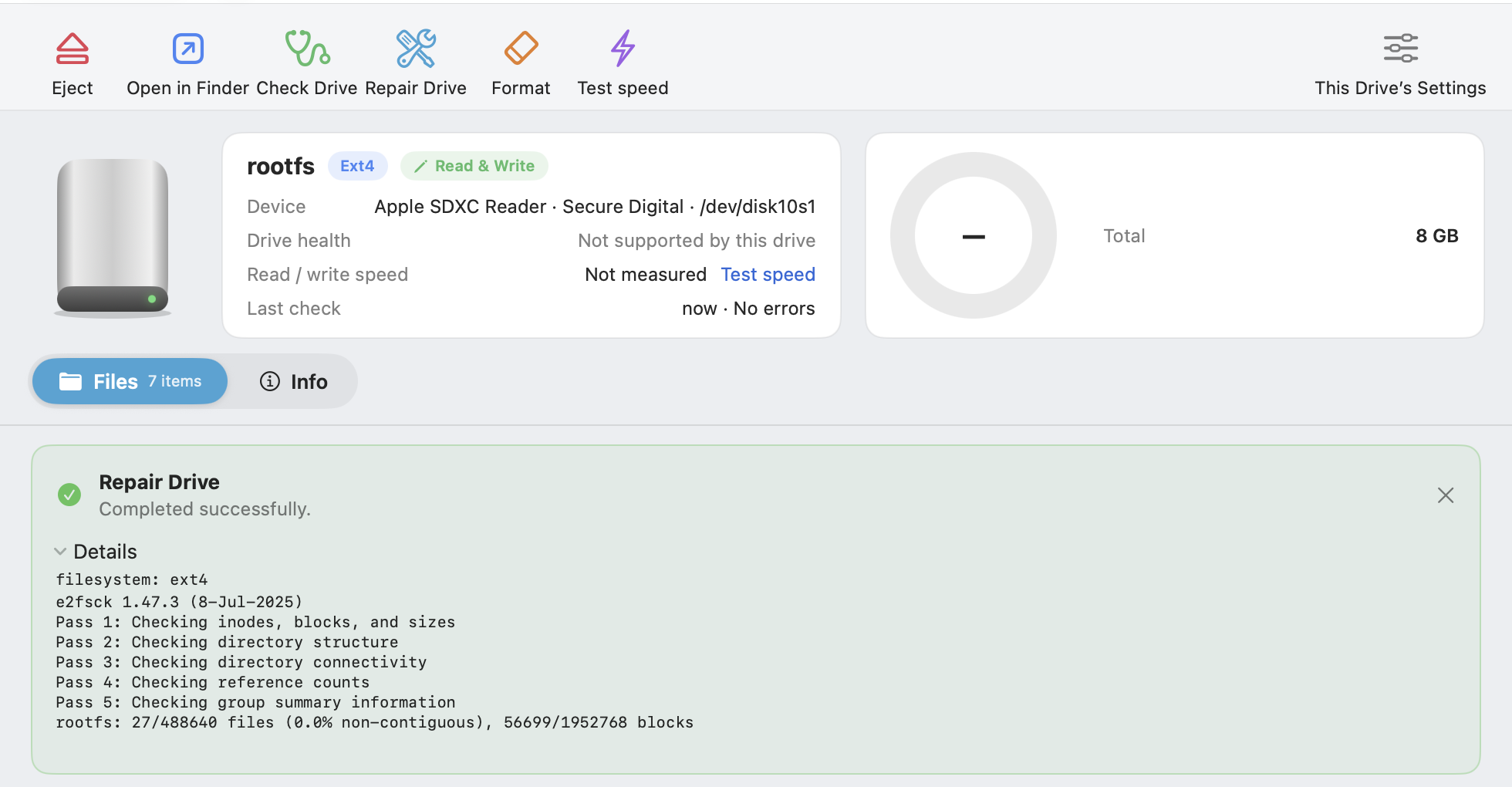
Pull the card without unmounting Ext4 properly and it may fail to mount next time. CrossDriver has file system check and repair built in, with clear progress and logs.

  • 1One-click Ext4 check & repair
  • 2Full logs available
  • 3Reopens by itself after the repair
CrossDriver Ext4 (Ext4 for Mac (mount ext4 on macOS)) screenshot: One-click check & repair (e2fsck); Full logs available; Reopens by itself after the repair
1One-click check & repair (e2fsck)
2Full logs available
3Reopens by itself after the repair
04Pro

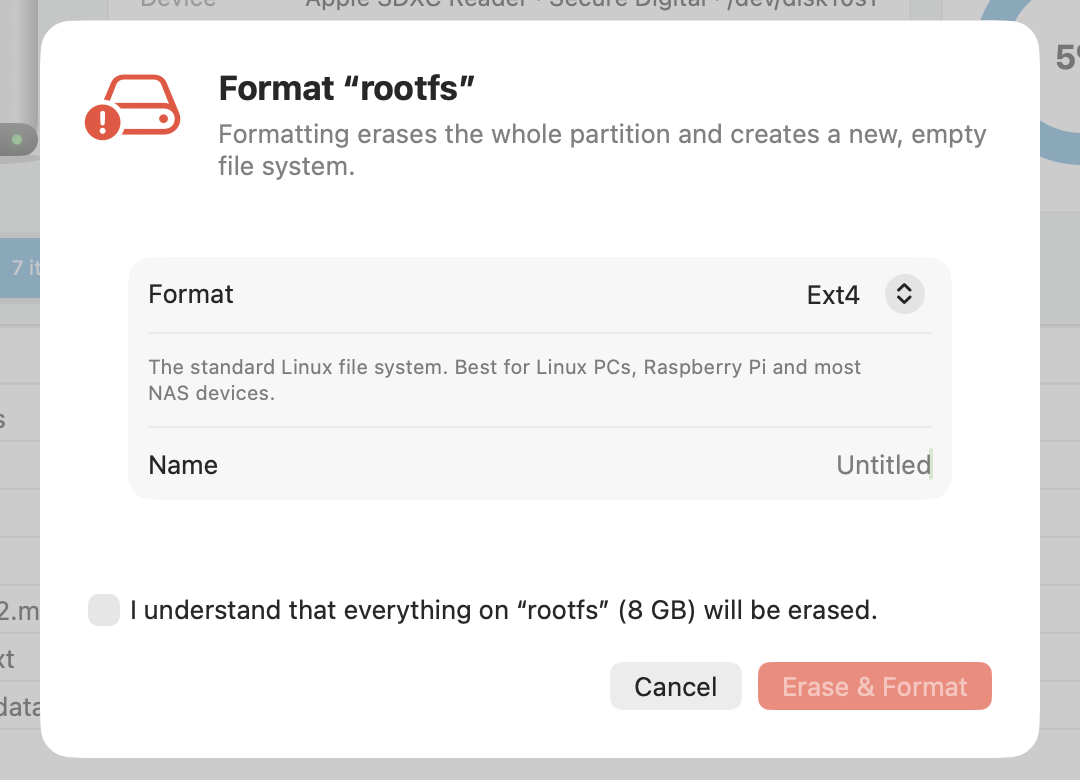
Format disks as Ext4 on your Mac

Prepare a new disk for a Raspberry Pi, Linux PC or NAS — no need to borrow another computer.

  • 1Choose Ext4
  • 2What each format is for, shown beside it
  • 3Check to confirm before erasing
CrossDriver Ext4 (Ext4 for Mac (mount ext4 on macOS)) screenshot: Choose a format; What each format is good for; Check to confirm before erasing
1Choose a format
2What each format is good for
3Check to confirm before erasing
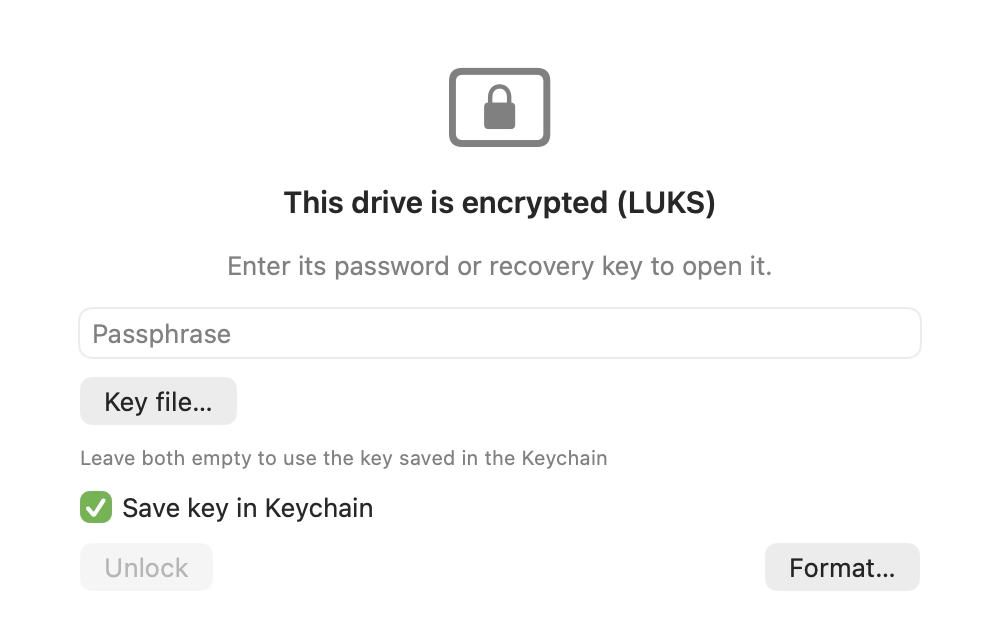
05Encryption

LUKS-encrypted Linux disks open on Mac, too

Unlock with your password or a key file, then read and write. Unlocking is a Pro feature; try it free for 7 days first.

  • 1Automatically detects LUKS1 / LUKS2
  • 2Password or key file — either works
  • 3Save to Keychain to unlock automatically next time
CrossDriver Ext4 (Ext4 for Mac (mount ext4 on macOS)) screenshot: Detects the encryption type automatically; Enter password; Save to Keychain, unlock automatically next time
1Detects the encryption type automatically
2Enter password
3Save to Keychain, unlock automatically next time
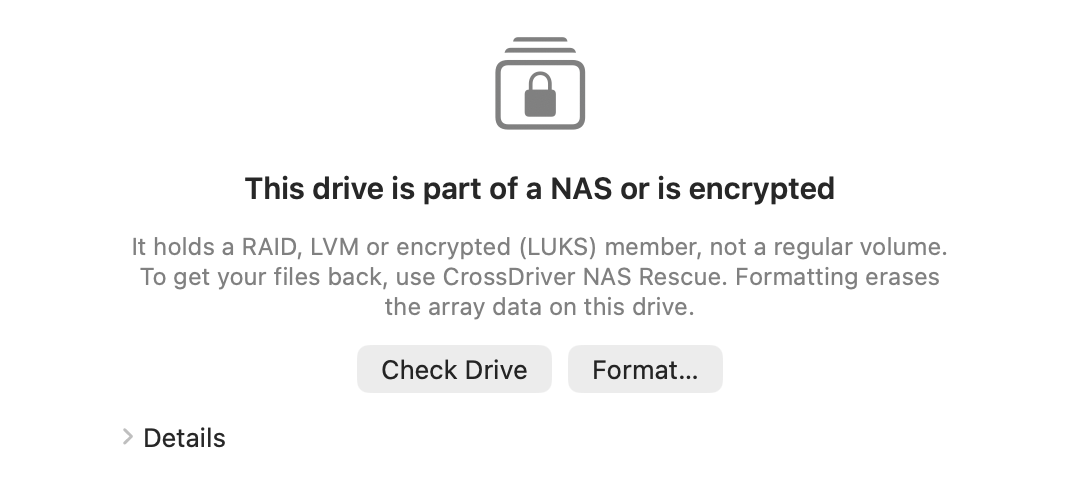
06NAS

Recognizes NAS drives and recommends the right app

Synology and QNAP drives are usually RAID or LVM members, so mounting one on its own won't show your files. CrossDriver recognizes them and suggests using Data Recovery NAS instead.

  • 1Recognizes RAID, LVM and encrypted member disks
  • 2Suggests Data Recovery NAS for a read-only rebuild
CrossDriver Ext4 (Ext4 for Mac (mount ext4 on macOS)) screenshot: Recognizes NAS array members; Suggests Data Recovery NAS instead
1Recognizes NAS array members
2Suggests Data Recovery NAS instead
Performance

Performance testing in progress

We're testing a traditional user-space tool, CrossDriver New Generation and the Kernel Edition on real Macs and disks. Once testing is complete, we'll publish the data, methodology and raw results here; until then, we won't quote any speed multiples.

Specs

Ext4 support at a glance

Disks are read and written by the native Ext4 driver in the Linux 6.18 kernel, so disks created by recent Linux versions open fine.

File system

Version
Ext2 · Ext3 · Ext4
Features
Journaling, extents, 64bit, metadata_csum, inline_data, bigalloc and more — see the table below
Single file
Up to 16 TiB (4 KB blocks)
Volume size
Up to 1 EiB
Format
ext4

Disks & connections

Connection
USB, Thunderbolt, SD card readers, drive docks
Partition table
GPT · MBR
Encryption
LUKS1 · LUKS2 (password or key file)
Simultaneous disks
Open several disks at once and eject each one separately

Mac requirements

System
macOS 12 or later
Chip
Apple silicon & Intel
Kernel extension
Not required
Engine
Runs only while a disk is open, typically using about 0.8 GB of memory
Feature compatibility

Opens Ext4 created by recent Linux versions

Some third-party tools explicitly don't support features such as metadata_csum and inline_data, so they fail to mount disks formatted by recent Linux versions. CrossDriver uses the Linux kernel's own driver.

Opens?Notes
extents · 64bit · flex_bg✓Core Ext4 features
metadata_csum (metadata checksums)✓Default for new Ext4 file systems on recent Linux
Journal✓Recovered from the journal by the Linux driver after an unexpected disconnect
inline_data · bigalloc · meta_bg✓Not supported by some third-party tools
Large directories (dir_index · largedir)✓
POSIX ACLs · extended attributes✓Preserved on disk for Linux to use
casefold (case-insensitive directories)Not yet supportedUsed by Steam Deck microSD cards
fscrypt encrypted directoriesNot yet supportedFull-disk LUKS encryption supported
Compare

How it compares

These are the common ways to use Ext4 on a Mac.

CrossDriver Ext4Traditional user-space toolsRun your own Linux VMKernel extension solutions
Read & write Ext4✓Mostly read-only, or unstable writes✓✓
Use directly in Finder✓✓Requires manual sharing setup✓
No need to lower your Mac's security settings✓Depends on the solution✓—
No command line needed✓Often requires Terminal to install—✓
Check & repair Ext4✓—Run e2fsck manuallyVaries by product
Format as Ext4✓—Run mkfs manuallyVaries by product
LUKS-encrypted drives✓—Run cryptsetup manuallyVaries by product

Traditional user-space tools are solutions built on user-space frameworks such as FUSE. Actual results vary by product.

Get started

Get started in three steps

  1. 1

    Download & install

    Download and install for free — no restart, no security changes.

  2. 2

    Plug in your disk

    Your disk appears in the sidebar automatically. Click "Open Disk".

  3. 3

    Browse or read & write

    Browse and copy read-only in Finder for free; upgrade to Pro to write, with a free 7-day trial first.

Works with

Works with mainstream Macs and drives of every brand

If it's Ext2, Ext3 or Ext4, it opens in Finder — whatever device or brand it came from.

Supported Macs

Models
MacBook Air, MacBook Pro, iMac, Mac mini, Mac Studio, Mac Pro
Chip
Apple silicon (the entire M1–M6 families, including Pro, Max and Ultra) and Intel processors
System
macOS 12 Monterey, 13 Ventura, 14 Sonoma, 15 Sequoia, 26 Tahoe and later

Supported disks

Type
Raspberry Pi SD / microSD cards, USB flash drives, external hard drives, and SATA / NVMe drives pulled from Linux PCs and servers (in an enclosure)
Connection
USB-A, USB-C, Thunderbolt, card readers, drive enclosures, drive docks
Brands
Works with every brand, such as Seagate, WD (Western Digital), Toshiba, Samsung T7 / T9, SanDisk, Kingston, Lexar, LaCie, UGREEN, ORICO and more

Common uses

Raspberry Pi & dev boards
System cards and data disks from Raspberry Pi, Jetson, Orange Pi and more
Linux PCs
Linux dual-boot partitions, drives pulled from old computers
Routers & download boxes
Ext4 drives attached to OpenWrt routers, download boxes and TV boxes
NAS backup drives
Synology and QNAP USB backup drives (Ext4)

Any brand, any capacity: if the format matches, it opens.

Next-gen engine

No kernel extensions.
No changes to your Mac's security settings.

The new CrossDriver reads and writes Ext4 disks with native Linux file system drivers, running inside an isolated, lightweight Linux environment. Your Mac stays at its factory security level.

✓ No kernel extension

Works right after install

No Recovery mode, no lowering security, no restart — and no broken drivers after a macOS update.

✓ Isolated

A dedicated engine for your disk

The engine only sees the disk you open, fully isolated from macOS and your other disks.

✓ Safe eject

Everything's written before you unplug

When you click "Eject", the engine writes all changes back to the disk before releasing it, so unplugging won't lose data.

All editions require macOS 12 or later and run natively on Apple silicon and Intel.

Pricing

Look for free first, upgrade when you need to write

The free version opens disks read-only in Finder so you can browse, preview and copy to your Mac — with no time limit. Try Pro free for 7 days.

Free

US$0

  • Detects and opens disks automatically
  • Read-only access in Finder
  • Preview photos, videos & documents
  • Copy files to your Mac
  • Check Disk
Free download · Includes 7-day Pro trial
Recommended

Ext4 Pro

US$59.95 Lifetime license · 1 year US$39.95 · 1 month US$19.95

  • Everything in Free
  • Read & write in Finder and all apps
  • Repair Ext4 file systems
  • Format as Ext4
  • Unlock LUKS-encrypted disks, read & write
  • Open in Finder automatically when plugged in
Buy Pro

Omni

US$79.95 Lifetime license · 1 year US$49.95 · 1 month US$24.95

  • Read & write NTFS, Ext4, XFS, Btrfs, F2FS and ZFS
  • Format in six formats
  • License also covers the standalone NTFS / Ext4 / XFS editions
Learn about Omni

Shares its license with the Kernel Edition (Ext4 For MAC): both the Kernel Edition and the new generation work on the same Mac. Each license covers 1 Mac and can be deactivated in the App and moved to another Mac — no account needed. Once activated it works offline: the App goes online once every 30 days to renew the license automatically (no payment involved), with a further 14-day grace period when offline. A lifetime license includes free updates to all future versions of this App, including major versions; 1-year and 1-month licenses are never charged automatically — the App reminds you to renew before they expire. After-sales and refund policy. Each code can be moved to another computer 3 times on your own; after that, contact support.

FAQ

Q&A

Can a Mac read ext4? How do I mount an ext4 drive on macOS?

macOS doesn't support Ext4, so when you plug one in you'll see "The disk you attached was not readable by this computer." Click "Ignore" — don't initialize it. Once CrossDriver Ext4 is installed, the disk appears in the sidebar automatically; click "Open Disk" to browse it in Finder. The free version is read-only; Pro can read and write. For full steps and a comparison with other options (virtual machines, command-line tools), see How to open Ext4, XFS and other Linux drives on a Mac.

Plugged a Raspberry Pi SD card into your Mac and only see the boot partition?

The boot (bootfs) partition on a Raspberry Pi SD card is FAT, which your Mac can read directly. The rootfs partition, which holds the system and your files, is Ext4 — you need CrossDriver Ext4 to open and edit it.

Can my Mac open drives attached to OpenWrt routers, download boxes or TV boxes?

Drives attached to these devices often use Ext4 (sometimes NTFS or exFAT). If your Mac says "The disk you attached was not readable by this computer.", it's most likely Ext4: click "Ignore" and open it with CrossDriver Ext4. If it's NTFS, use CrossDriver NTFS.

Are Ext2 and Ext3 supported?

Yes. Ext2, Ext3 and Ext4 can all be browsed, read and written; formatting is available for Ext4.

Could it damage my Ext4 disk?

Writes are handled by the Linux kernel's native Ext4 driver with journaling protection. Click "Eject" before unplugging and the engine writes your changes back to the disk first. If the disk is ever disconnected unexpectedly, use the built-in check and repair.

What tool does check and repair use?

It's e2fsck, the official Linux tool — exactly the same as running it on a Linux computer, with progress and full logs visible.

Can it open Steam Deck microSD cards?

Not yet. Steam Deck microSD cards use the casefold (case-insensitive) feature, which isn't supported yet.

How does it look different in Finder?

The disk shows up in Finder as a network disk; opening, copying, editing and saving work just like on a regular disk.

Are newer features like 64bit and metadata_csum supported?

Yes. Disks are read and written by the Linux kernel's native driver, so Ext4 created by default on recent Linux distributions opens fine.

Will files written from a Mac work normally back on Linux?

Yes. Files are written by Linux's own Ext4 driver, just as if they were written on a Linux computer.

How many disks can I open at once?

You can open several disks at once and eject each one from the sidebar independently.

Can I open a Synology drive directly with CrossDriver Ext4?

Synology data usually sits on top of RAID or LVM, so a single drive can't be mounted directly. Use Data Recovery NAS, which rebuilds the array read-only.

Does it work on M1–M6 Macs? Do I need to disable SIP or install a kernel extension?

Yes, it works — and no, you don't. CrossDriver runs natively on Apple silicon Macs such as M1–M6 as well as Intel Macs, on macOS 12 Monterey, 13 Ventura, 14 Sonoma, 15 Sequoia, 26 Tahoe and later. It uses macOS's built-in virtualization framework to run an isolated, lightweight engine that reads and writes your disks — no kernel extension, no disabling SIP, no changes to any security settings, and no restart after installing.

Can I try Pro first?

Yes. CrossDriver NTFS, Ext4, XFS and Omni all offer a free 7-day Pro trial in the app — once per Mac, no payment details required. After the trial ends, your disks remain accessible read-only and your files are unaffected.

How is it different from the Kernel Edition on crossdriver.com?

The Kernel Edition is NTFS For Mac, Ext4 For MAC and XFS For MAC on crossdriver.com: it runs as a kernel extension and requires lowering system security on Apple silicon Macs. The new generation doesn't rely on kernel extensions, reads and writes through the Linux kernel's own drivers, gives read-only access in Finder even in the free version, and Pro has repair, formatting and encrypted-disk unlocking built in, with no extra plug-in to buy. Both generations cost the same and share one license: buy once and use both the Kernel Edition and the new generation on the same Mac. If you've already bought the Kernel Edition, please refer to the Kernel Edition product page.

What should I do before unplugging?

Click "Eject" in the sidebar or on the disk page. CrossDriver writes your changes back to the disk first, then lets you know it's safe to unplug.

If I buy Omni, do I still need to buy NTFS, Ext4 or XFS separately?

No. An Omni Pro license also covers CrossDriver NTFS, Ext4 and XFS.

Does it work with Seagate, WD (Western Digital), Toshiba, Samsung T7, SanDisk and other brands?

Yes. Whether a disk opens depends only on its format, not on brand, capacity or connection: external hard drives, portable SSDs, USB flash drives, SD cards, and SATA / NVMe drives in an enclosure all work, over USB or Thunderbolt.


Linux disks, fully usable on your Mac

Download CrossDriver Ext4 and open your disk for free.

macOS 12 or later · Apple silicon & Intel · Privacy Policy · Pricing · Open-Source Licenses

Downloads are counted anonymously; no personal information is recorded.