CrossDriver Data Recovery NASFree scan and preview · See your files before you pay

NAS died? Plug its drives into your Mac
Get your files out

Data Recovery NAS is NAS data recovery software for the Mac: take the drives out of a Synology, QNAP, UGREEN, Unraid, or TrueNAS box and connect them to your Mac. No Windows PC, no Ubuntu USB stick, not a single command: it rebuilds RAID, LVM, Btrfs, and ZFS automatically, even with a drive missing. Everything stays read-only, and you see your files for free before deciding to recover them.

Opened read-only — nothing is written to the original diskNo kernel extensionFiles never uploaded

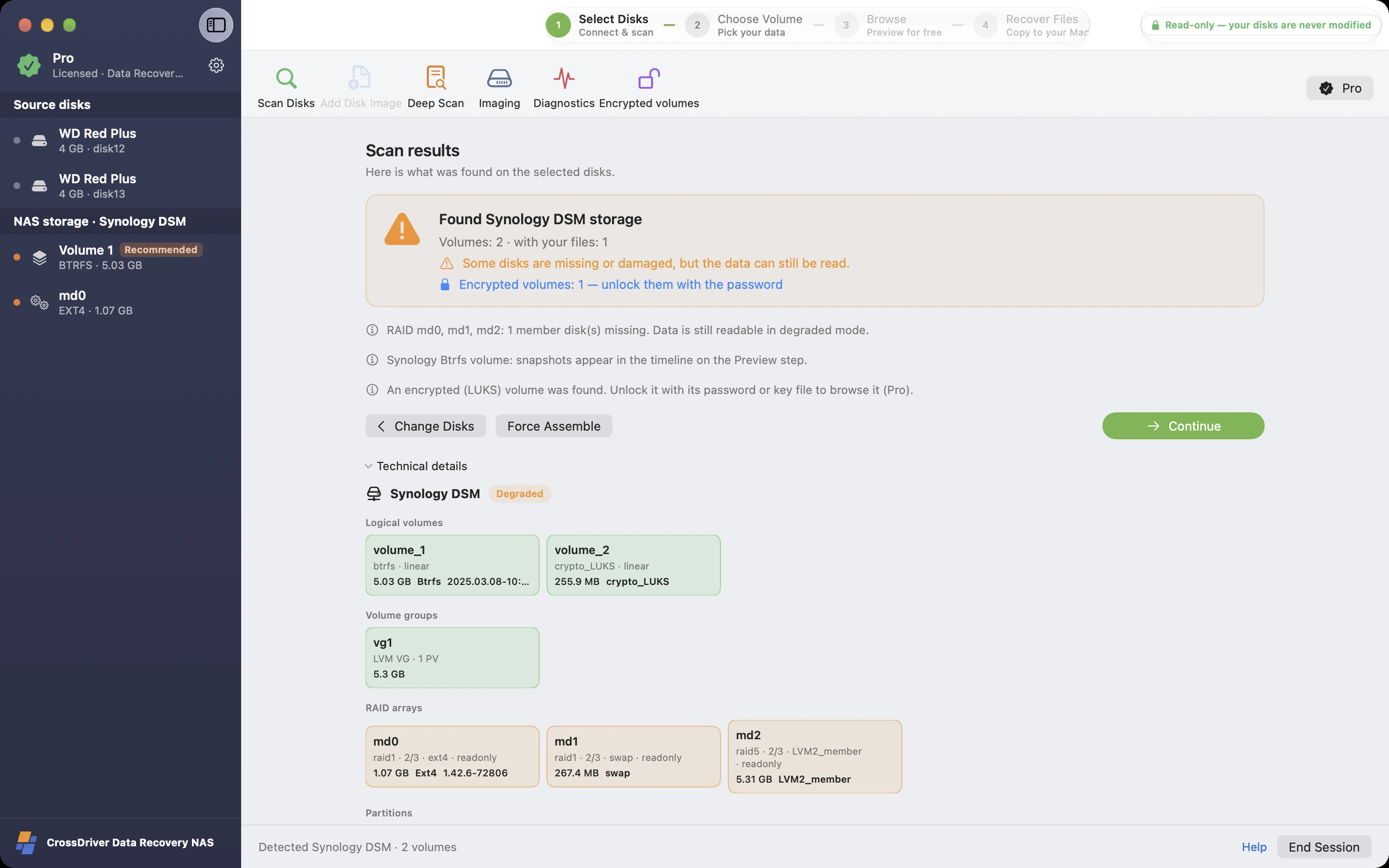
CrossDriver Data Recovery NAS (Synology / QNAP NAS data recovery for Mac) screenshot: Read-only throughout; Four-step wizard: Select disks → Choose volume → Browse → Recover; Automatically recognizes Synology, QNAP, UGREEN, Unraid, TrueNAS; Missing a disk? Degraded arrays still assemble; See the storage layout at a glance: RAID → LVM → Btrfs
1Read-only throughout
2Four-step wizard: Select disks → Choose volume → Browse → Recover
3Automatically recognizes Synology, QNAP, UGREEN, Unraid, TrueNAS
4Missing a disk? Degraded arrays still assemble
5See the storage layout at a glance: RAID → LVM → Btrfs
CrossDriver Data Recovery NASFree scan and preview · See your files before you pay

NAS broken? Connect the drives to a Windows PC
Get your files out

CrossDriver Data Recovery NAS: take the drives out of a Synology, QNAP, UGREEN, Unraid or TrueNAS and connect them to a Windows PC — no Ubuntu USB stick, not a single command. It rebuilds RAID, LVM, Btrfs and ZFS automatically, even with a drive missing. Read-only throughout: see your files free first, then decide whether to recover.

Opened read-only — nothing is written to the original diskNo kernel driverFiles never uploaded

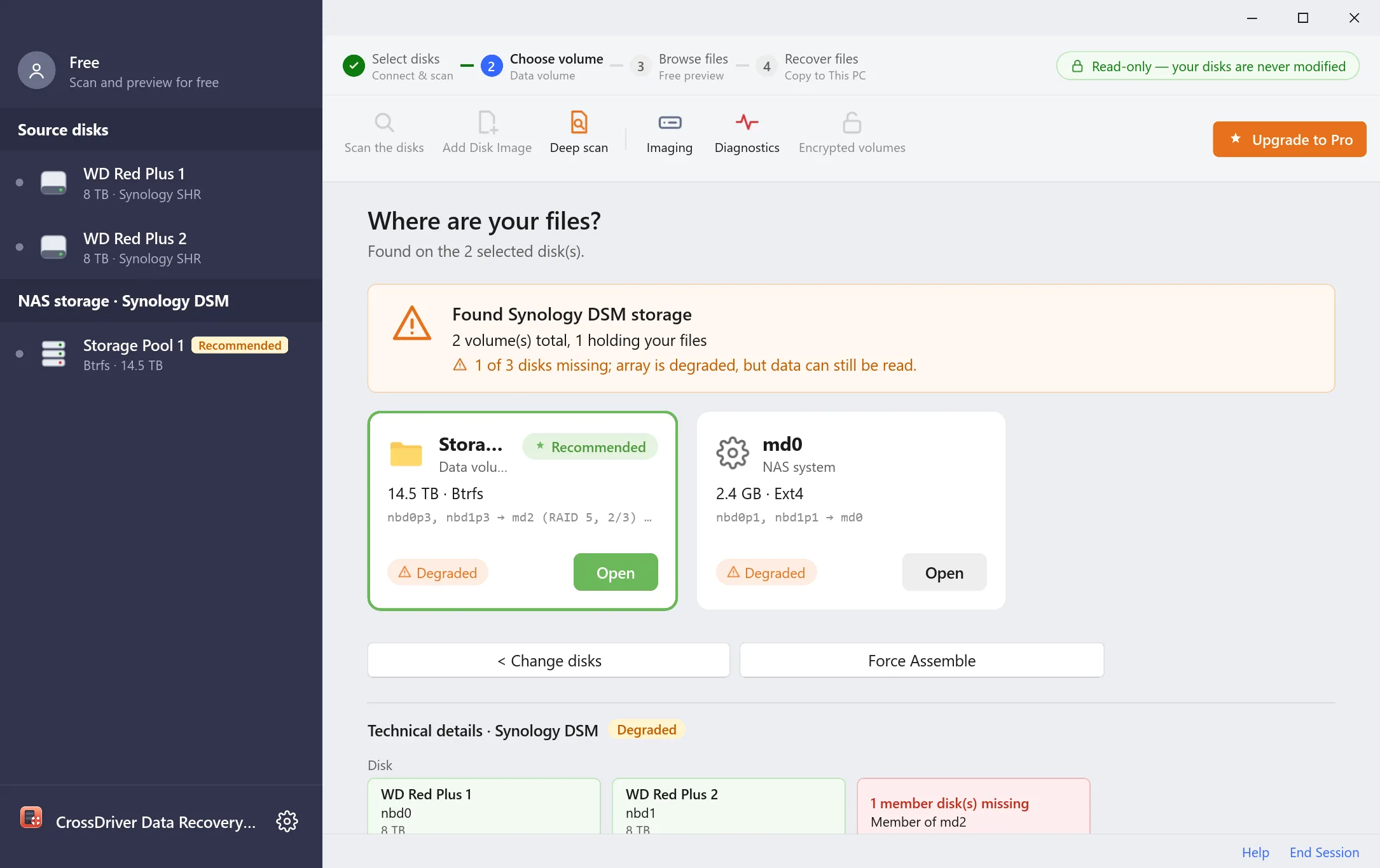
CrossDriver Data Recovery NAS (Synology / QNAP NAS data recovery for Windows) screenshot: Read-only throughout; Recognizes Synology DSM storage automatically; Readable with one drive missing; Forced assembly writes only to an in-memory overlay; The storage layout at a glance
1Read-only throughout
2Recognizes Synology DSM storage automatically
3Readable with one drive missing
4Forced assembly writes only to an in-memory overlay
5The storage layout at a glance

Reads drives from these NAS systems

SynologySynology · SHR / RAIDQNAPQNAP · QTS / QuTS heroUGREENUGREEN · UGOSUnraidXFS / Btrfs arraysTrueNASZFS poolsDIY Linuxmdadm / LVM
RAID 0/1/5/6/10SHRLVMBtrfsExt4XFSZFSLUKS encryptionBitLockerZFS native encryption
When you need it

Your NAS won't start, but the data is still on the drives

When a NAS "dies," it's usually the motherboard, power supply or system that failed — the files on the drives are intact. Connect the drives to a Mac and you can read them.

🔌

Hardware failure

The motherboard or power supply burned out, or the model is discontinued and can't be replaced — but the drives are fine.

⚠️

Degraded array

A disk dropped out or a rebuild was interrupted, and the storage pool shows "Crashed" or "Read-only."

🔄

Failed system update

DSM / QTS won't boot after an update, or volumes are missing after a reset.

📦

Moving to a new NAS

Migrate an entire volume from your old NAS to a new disk — even SHR to a single disk.

Hold on

When your NAS has a problem, don't do these things first

A lot of data isn't lost to the original failure, but to the "rescue" attempts that follow.

✋

Don't click "Repair" on the NAS

Rebuilding a degraded array rewrites every member disk; if something else goes wrong midway, data that was readable may become unreadable.

✋

Don't click "Initialize"

When you connect a NAS drive to a Mac, macOS says "The disk you attached was not readable by this computer." Click "Ignore" — never initialize or erase it.

✋

Don't force-assemble and then add disks

Command-line tutorials online often suggest mdadm --force followed by --add, which starts rewriting the array before you've recovered your data.

🔇

Strange noises? Power off first

A drive that clicks, won't spin up or keeps disconnecting has a physical fault. Stop powering it and take it to a professional data recovery service.

How it works

Four steps, zero commands

All you need is a SATA-to-USB adapter or drive dock for each NAS drive.

  1. 1

    Select disks

    Connect the drives, select every disk in the same storage pool and click "Scan Disks."

  2. 2

    Choose volume

    Data Recovery NAS marks the data volume holding your shared folders as "Recommended."

  3. 3

    Browse files

    Browse folders just like on your NAS, and preview photos, videos and documents for free.

  4. 4

    Recover files

    Copy to another drive, keeping modification dates and verifying each file.

01Choose volume

No RAID knowledge needed to find the right volume

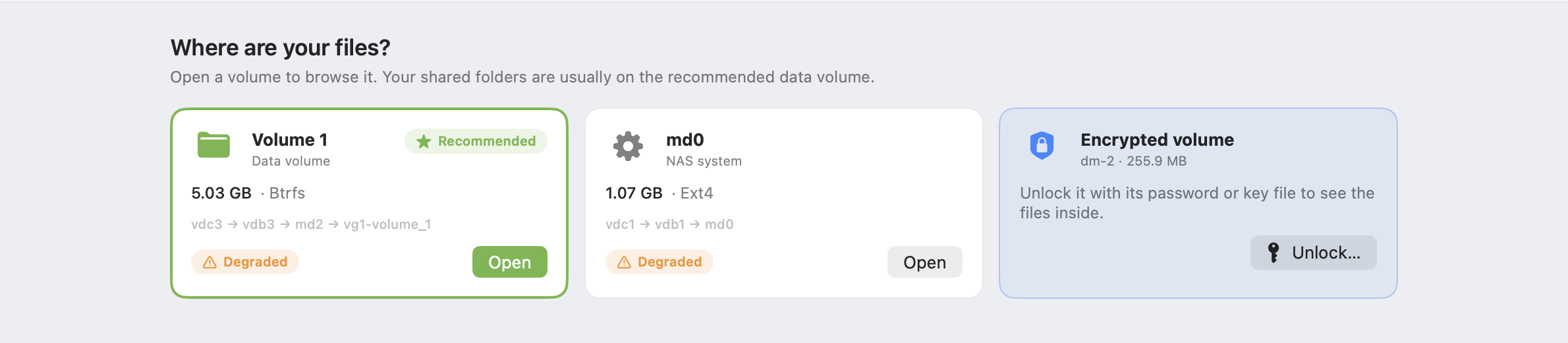
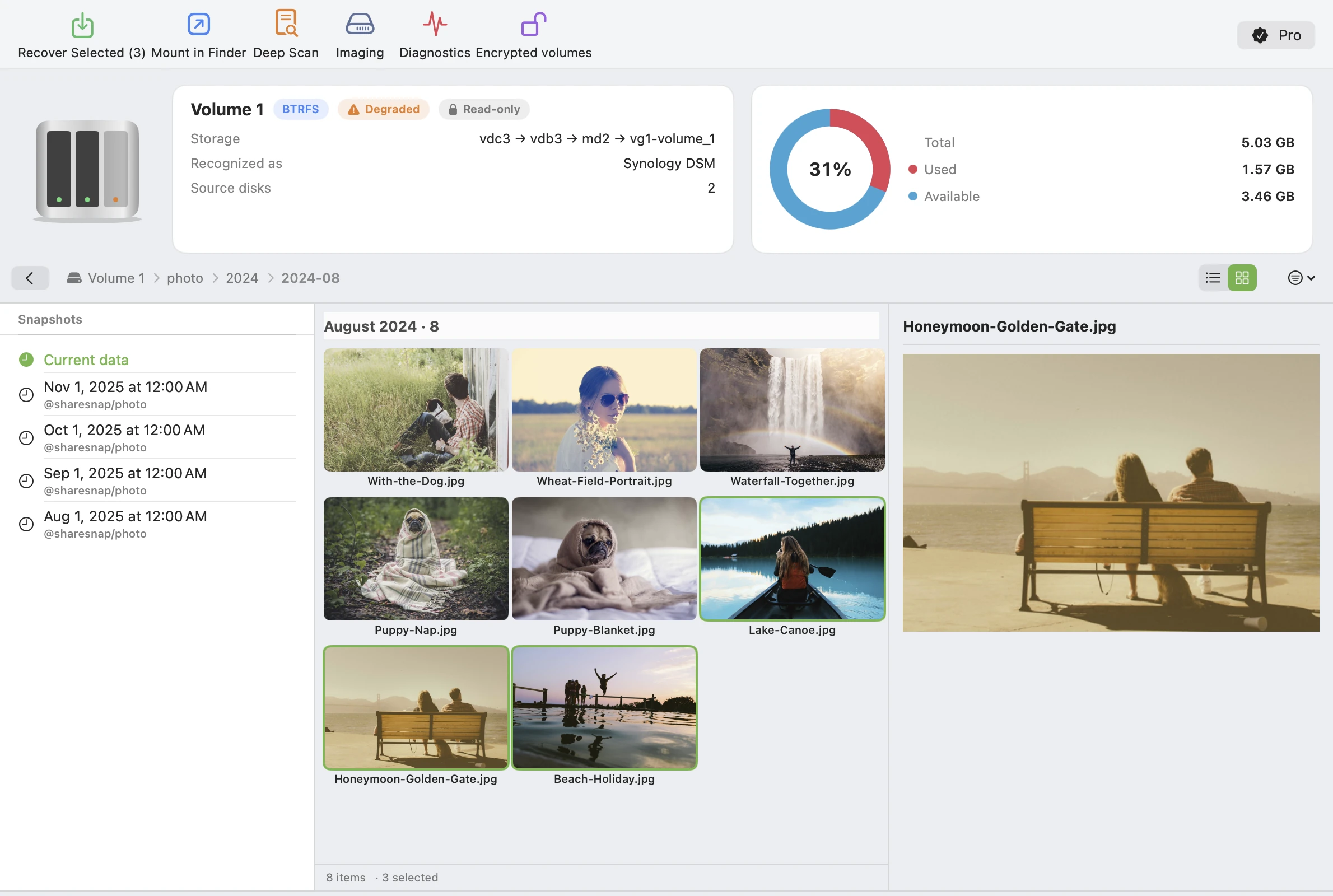
A Synology drive typically holds a system partition, a swap partition and data volumes. Data Recovery NAS marks only the one holding your shared folders as "Recommended," using the same name you see in DSM.

  • 1The data volume is marked "Recommended" and keeps its DSM name, "Volume 1," with file system and used space shown
  • 2System and swap partitions are sorted out automatically, so you won't open them by mistake
  • 3Encrypted volumes are listed separately and unlock read-only with a password
CrossDriver Data Recovery NAS (Synology / QNAP NAS data recovery for Mac) screenshot: Recommended data volume; System partitions set apart; Encrypted volumes can be unlocked
1Recommended data volume
2System partitions set apart
3Encrypted volumes can be unlocked
02Free preview

See your photos before you decide to buy

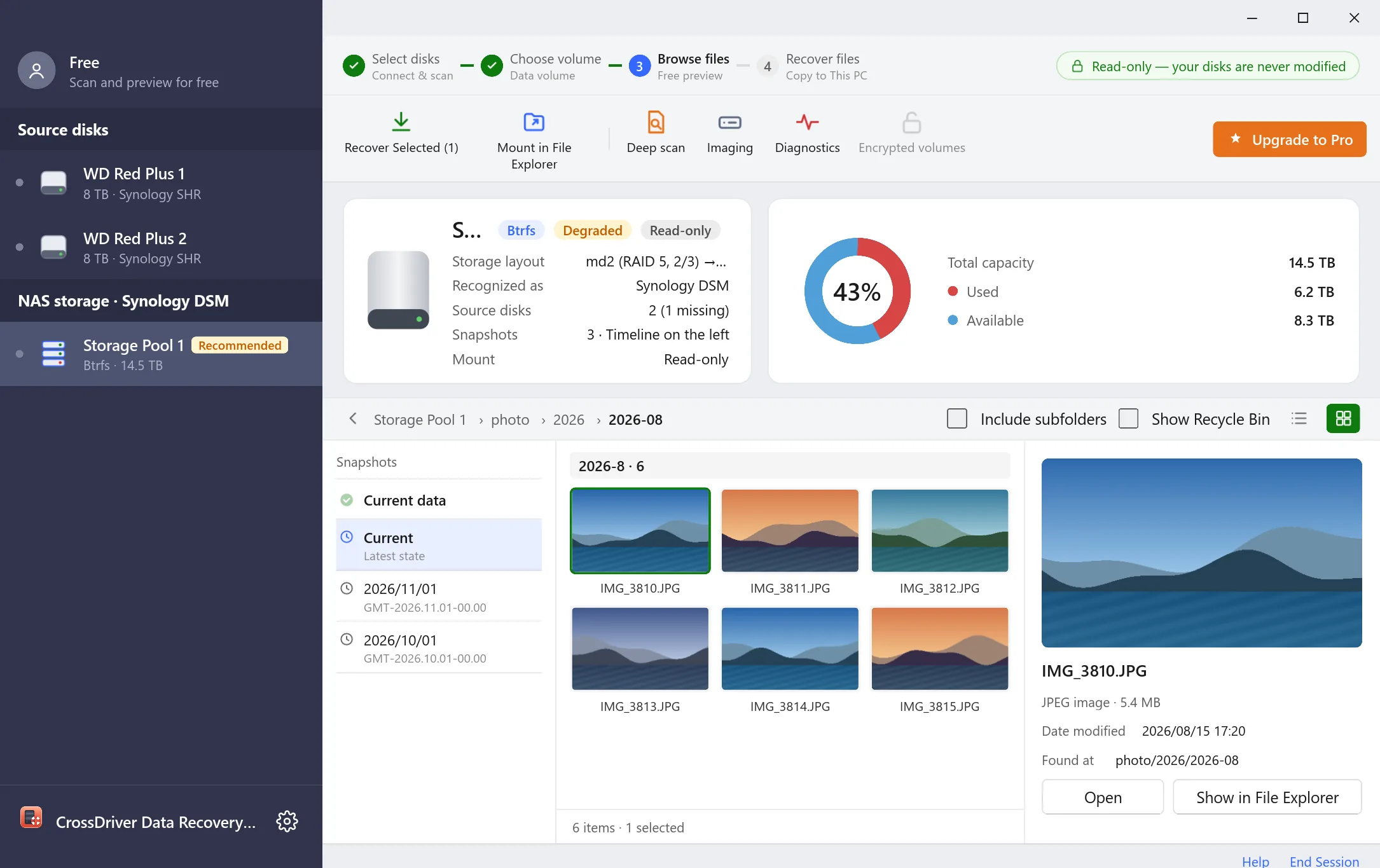
Scanning, browsing and previewing are free, with no time limit. Open a photo, a contract or a video, make sure your files are really there, then upgrade to recover.

  • 1Clickable path to jump back to any parent folder
  • 2Photo wall grouped by month, with subfolders optionally included
  • 3Preview photos, RAW, PDF, Word, audio and video — content stays in memory and is never written to disk
  • 4Select files or folders and click "Recover Selected"
CrossDriver Data Recovery NAS (Synology / QNAP NAS data recovery for Mac) screenshot: Clickable path; Photo wall grouped by month; Free preview; Recover Selected
1Clickable path
2Photo wall grouped by month
3Free preview
4Recover Selected
03Snapshots

Deleted files by mistake? Go back to a snapshot

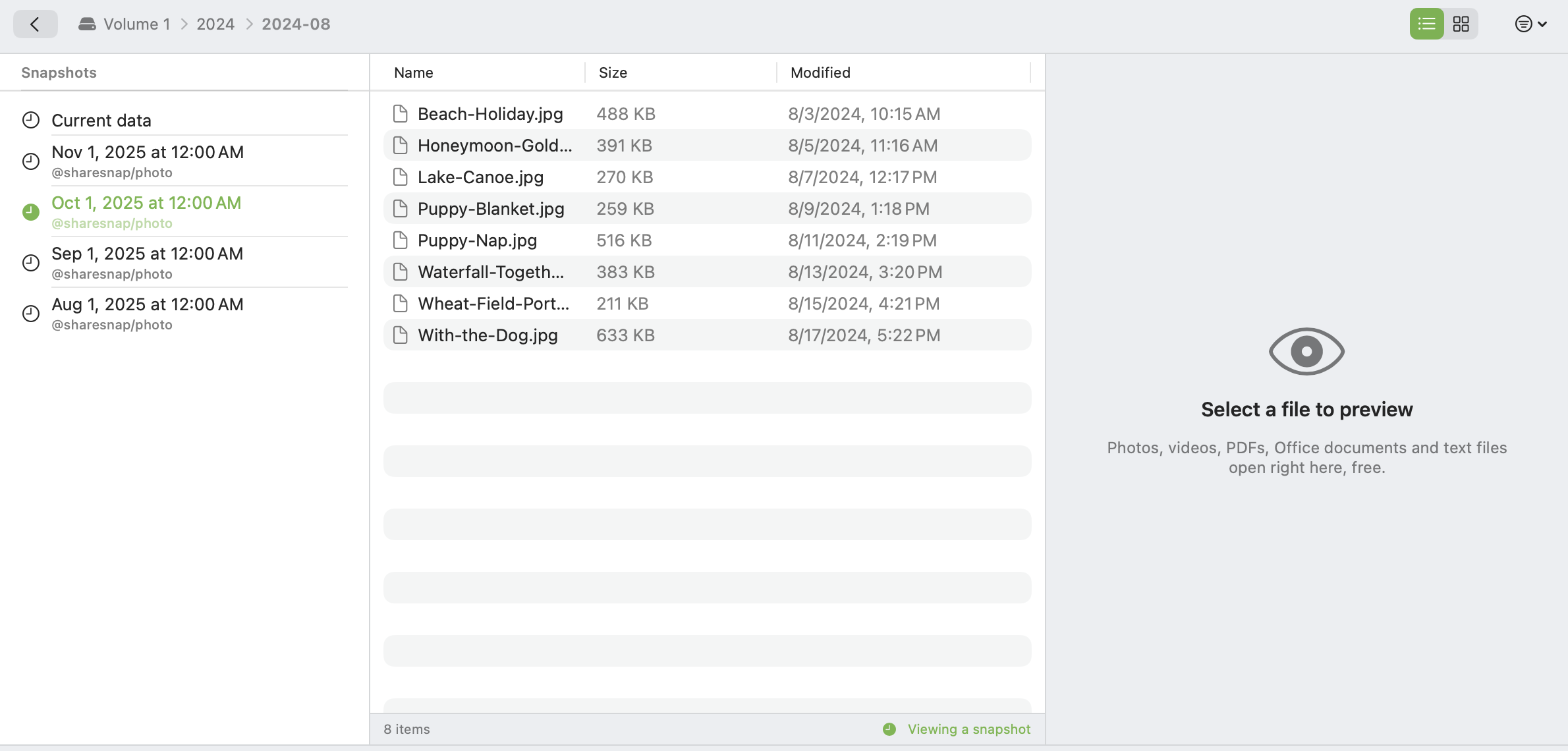
Snapshots on Synology Btrfs volumes are listed by time. Pick a date to see your folders as they were then — no need to fix the NAS first.

  • 1Detects Synology @GMT snapshots automatically and shows them in local time
  • 2Browse snapshots exactly like current data and recover directly

Also works with snapshots taken before a ransomware attack: snapshots are read-only and stay untouched during recovery.

CrossDriver Data Recovery NAS (Synology / QNAP NAS data recovery for Mac) screenshot: Snapshot timeline; Viewing files from October 1
1Snapshot timeline
2Viewing files from October 1
04Recovery

Every file verified, with a clear record of anything damaged

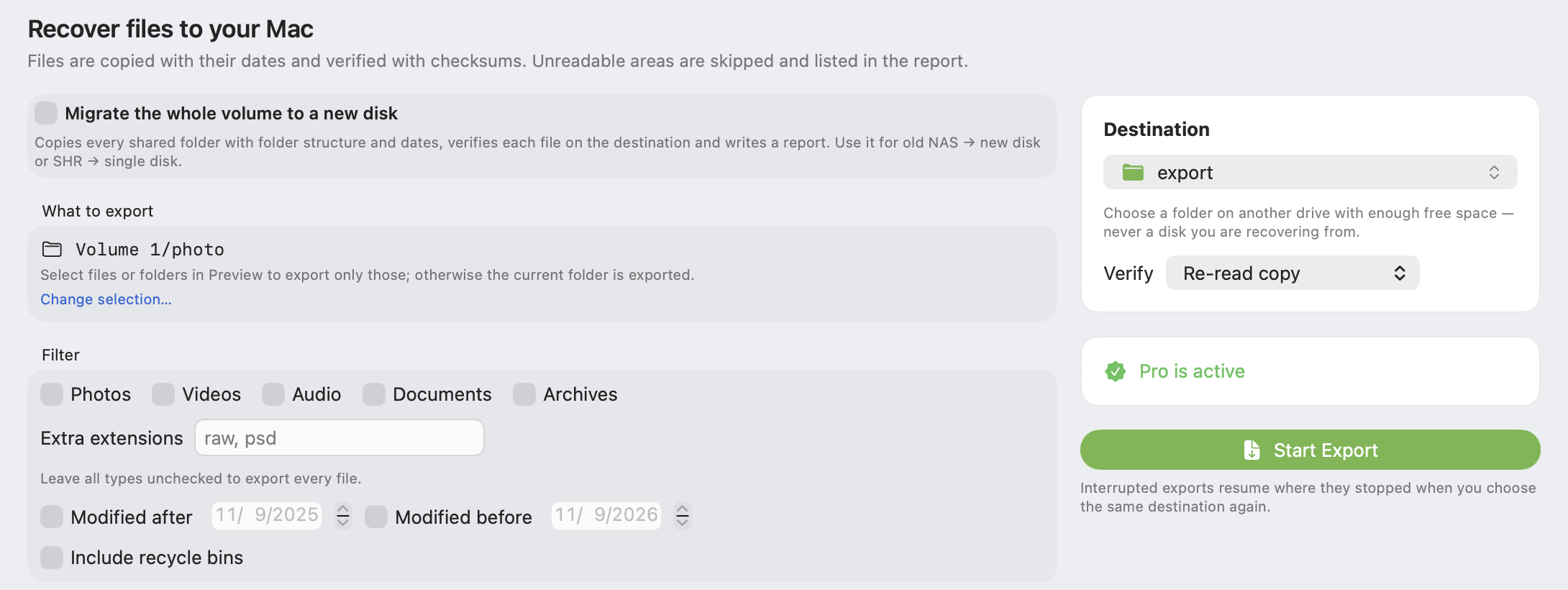
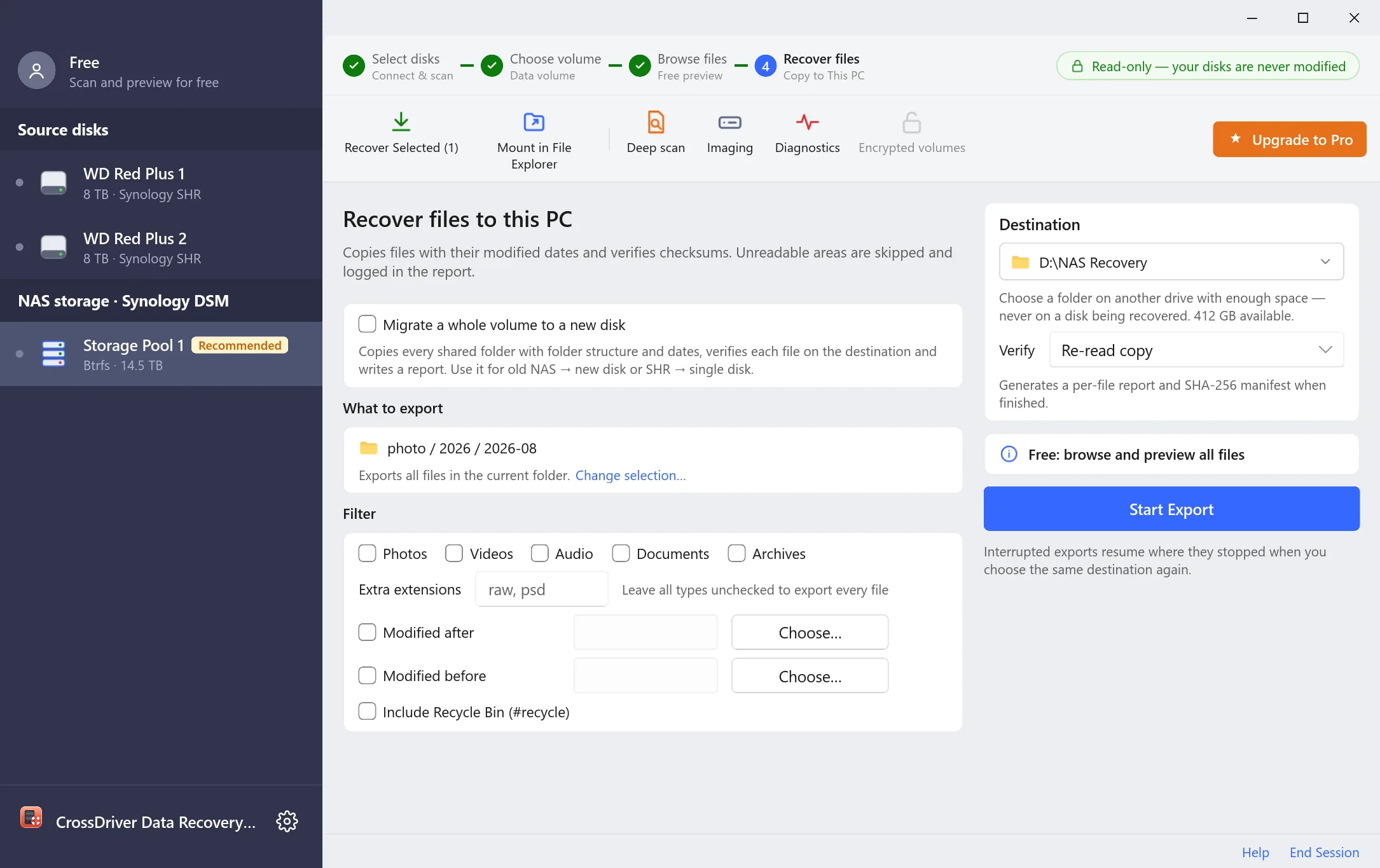
Recovery is more than "copying." Data Recovery NAS keeps track of every step, and unreadable areas won't stall the whole job.

  • 1Filter by type (photos, videos, documents…) and modification date
  • 2SHA-256 read-back verification, or file-by-file comparison with the source
  • 3Bad areas are skipped automatically, zero-filled and logged in a report, with a full checksum list
  • 4If interrupted, choose the same destination to resume
CrossDriver Data Recovery NAS (Synology / QNAP NAS data recovery for Mac) screenshot: Filter by type; SHA-256 verification; Bad areas skipped and logged; Resume after interruption
1Filter by type
2SHA-256 verification
3Bad areas skipped and logged
4Resume after interruption
05Disk imaging

Drive showing warnings? Make a full copy first

Before scanning, Data Recovery NAS runs a health triage: it reads SMART data and measures actual read speed. If a drive is failing, it recommends imaging it first, then reads only from the image so the original drive isn't stressed further. Reading SMART requires smartmontools (brew install smartmontools); without it, only the read-speed test is performed.

  • 1"Quick Copy" skips bad areas first, then "Retry Bad Areas" works through them slowly
  • 2Live heat map shows which areas have been read and which can't be
  • 3Start browsing files in the image before imaging finishes

Based on GNU ddrescue and resumable after interruption. For RAID, image each member disk separately.

1Quick copy first, then retry bad areas
2Live bad-area heat map
3Browse while imaging
06Encrypted volumes

Open encrypted volumes on your Mac, too

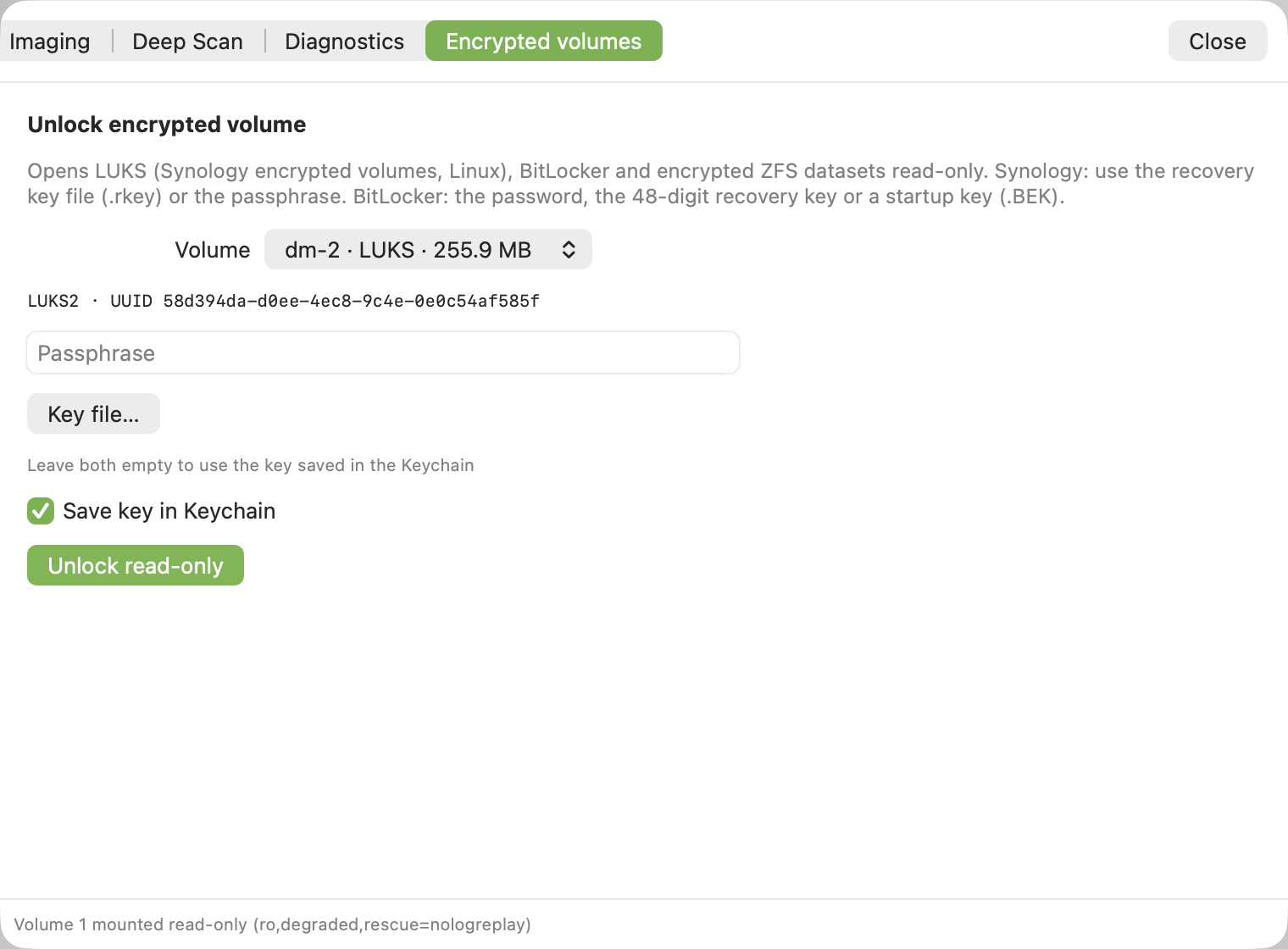
Synology encrypted volumes (LUKS), Windows BitLocker drives and TrueNAS encrypted datasets can all be unlocked read-only.

  • 1Detects encryption type and key protectors automatically
  • 2Supports passwords, Synology .rkey files, BitLocker 48-digit recovery keys and .BEK files
  • 3Save to Keychain to unlock automatically next time you connect

BitLocker drives protected only by TPM need the 48-digit recovery key once removed from the original PC.

CrossDriver Data Recovery NAS (Synology / QNAP NAS data recovery for Mac) screenshot: Synology encrypted volume (LUKS2); Password or .rkey recovery key file; Save to Keychain
1Synology encrypted volume (LUKS2)
2Password or .rkey recovery key file
3Save to Keychain
07Three layers of read-only protection

The last thing a rescue tool should do
is write to a failing drive

Data Recovery NAS reads your drives inside an isolated, lightweight Linux environment, with three locks between it and your Mac. If any lock isn't engaged, it stops before touching the disk.

🔒 Lock 1

On the Mac

Drives are opened read-only and handed to the rescue environment as read-only devices, so writes are blocked at the system level.

🔒 Lock 2

Rescue environment

RAID is assembled read-only, LVM is activated read-only and every mount is forced to ro; when "Force Assemble" is needed, changes go only to an in-memory overlay.

🔒 Lock 3

Interface

The app checks the access policy reported by the rescue environment every time and stops immediately if it isn't "read-only."

No kernel extension, no Recovery Mode, and no reduction in your Mac's system security.

08Pro

Open in Finder and use it like any other disk

With Pro, data volumes mount read-only in Finder, so any app can open the files directly.

  • 1Data volumes appear in the Finder sidebar; open files with the apps you already use
  • 2Mounted read-only, so mistakes can't change the original disk
  • 3Open Time Machine backups (.sparsebundle) inside the volume read-only

Pro also includes: full-volume migration (copies an entire volume with read-back verification, ideal for old NAS → new disk), btrfs restore (rescues files directly when Btrfs won't mount) and array rebuild (rebuilds md arrays on an overlay without writing to member disks). Diagnostics are free.

1Appears in the Finder sidebar
2Read-only mount
3Open Time Machine backups read-only
How read-only works

What Data Recovery NAS does not do to your drives

✕

Rebuild arrays

It never rebuilds or resyncs RAID on member disks. When "Force Assemble" or a rebuild with the original parameters is needed, changes go only to an in-memory overlay.

✕

Repair file systems

It never runs fsck, xfs_repair or btrfs check --repair on the original disks. Disks are attached as read-only devices, and no journal is written back when mounting.

✕

Rewrite disk metadata

It never writes superblocks, partition tables or LVM metadata; encrypted volumes are unlocked read-only, too.

✕

Upload your data

File names, paths and contents never leave your Mac, and everything works offline.

What's supported

Covers mainstream NAS storage layouts

Common storage layouts from Synology, QNAP, UGREEN, Unraid, TrueNAS and self-built Linux systems are all supported. Not sure? Scan with the free version first and see the result at a glance.

Detection & assemblyBrowse & previewRecovery & exportNotes
Synology SHR✓✓✓Tested: three-disk array (md + LVM + Btrfs)
Synology SHR-2SupportedSupportedSupportedAssembled read-only with mdadm, same as SHR
Synology classic RAID 0/1/5/6/10SupportedSupportedSupportedAssembled read-only with mdadm, same as SHR
Synology Btrfs snapshots✓✓✓Tested: browse @GMT snapshots by time
Synology encrypted volumes (LUKS)SupportedSupportedSupportedPassword or .rkey recovery key
Synology encrypted shared folders (eCryptfs)Not yet supported——
QNAP QTS storage poolsSupportedSupportedSupportedReal-device testing in progress
QNAP QuTS hero (ZFS)SupportedSupportedSupportedRead-only pool import
TrueNAS (ZFS)SupportedSupportedSupportedIncluding natively encrypted datasets
Unraid arraysSupportedSupportedSupportedEach data disk read separately (XFS / Btrfs)
UGREEN UGOSSupportedSupportedSupported
DIY Linux (mdadm / LVM)SupportedSupportedSupportedExt4 · XFS · Btrfs

✓ means tested and passed on real drives or images in November 2026; “Supported” means the feature is implemented with standard Linux tools and real-device testing is in progress. Not sure? Scan with the free version first and see the result at a glance.

Works with

Works with mainstream Macs and NAS drives of every brand

Supported Macs

Models
MacBook Air, MacBook Pro, iMac, Mac mini, Mac Studio, Mac Pro
Chip
Apple silicon (the entire M1–M6 families, including Pro, Max and Ultra) and Intel processors
System
macOS 12 Monterey, 13 Ventura, 14 Sonoma, 15 Sequoia, 26 Tahoe and later

Compatible drives

Drives
3.5- and 2.5-inch NAS hard drives and SSDs, such as Seagate IronWolf, WD Red, Toshiba N300 and the Synology HAT series
Connection
SATA-to-USB cables, drive docks and multi-bay enclosures
Destination disk
An external drive or your Mac's internal disk with enough space for the recovered files

Compatible NAS

Synology
DS218+, DS220+, DS224+, DS920+, DS923+ and other models using SHR / RAID
Other brands
QNAP, UGREEN, Unraid, TrueNAS, DIY Linux NAS
Notes
It depends on the storage layout, not the NAS model — see the support table above

If a drive makes strange noises, won't spin up or has other physical faults, take it to a professional data recovery service.

Compare

Compared with the official Ubuntu method

Synology's official method (Synology Knowledge Center): find a PC, install all the drives, boot from an Ubuntu USB stick, then type a series of commands.

Data Recovery NASOfficial Ubuntu method
Hardware neededYour Mac + USB drive dockA PC with enough drive bays + USB stick
Works on Mac✓—
WorkflowFour-step wizardCommand line; you identify device paths yourself
Writes to drivesStrictly read-onlyAssembled per the tutorial; adding --force updates the array metadata on member disks
Compatibility with newer systemsBuilt-in engine, works out of the boxRequires the matching Ubuntu version as specified in the tutorial
Encrypted volumesEnter the password in the wizardManual cryptsetup; key must be decoded first
Preview & verificationBuilt-in preview, SHA-256 verified exportCopy and check it yourself
Compare

Compared with other recovery options

Data Recovery NASWindows recovery softwareCross-platform pro recovery softwareData recovery company
Works on Mac✓—✓—
Synology SHR✓Varies by product✓✓
Synology encrypted volumesSupportedVaries by productOften needs a higher edition✓
Free preview before buying✓✓Limited exportQuote after evaluation
SHA-256 verified export✓———
Mount in Finder✓———
Failing-drive imaging & heat map✓Varies by productVaries by product✓
Physical drive failure———✓

When a drive has a physical fault, no software can help — contact a professional data recovery service directly.

09Pricing

See it first, then pay

Scanning, browsing and previewing are free, with no time limit. Upgrade to recover once you've confirmed your files are there.

Free

US$0

  • Detect NAS, rebuild RAID / LVM / ZFS
  • Health triage & diagnostics
  • Browse all folders and snapshots
  • Preview photos, documents, audio & video
Free Download
Recommended

Data Recovery NAS Pro

US$69.95 Lifetime license · 1 year US$39.95

  • Everything in Free
  • Unlimited, verified file recovery to your Mac
  • Mount in Finder · Full-volume migration
  • Disk imaging · Encrypted volume unlock
  • btrfs restore · Array rebuild
Buy Pro

Data Recovery Pro

US$49.95 Lifetime license · 1 year US$29.95 · 1 month US$19.95

  • Undelete, deep scan, find partitions
  • Recover 500 MB free, 2 GB after sharing
  • Data Recovery NAS licenses work here too
Learn about Data Recovery

Each license covers 1 Mac and can be deactivated in the App and moved to another Mac — no account needed. Once activated it works offline: the App goes online once every 30 days to renew the license automatically (no payment involved), with a further 14-day grace period when offline. A lifetime license includes free updates to all future versions of this App, including major versions; 1-year and 1-month licenses are never charged automatically — the App reminds you to renew before they expire. After-sales and refund policy. Each code can be moved to another computer 3 times on your own; after that, contact support.

10Data never leaves your Mac

Your files stay on your Mac

Read-only

Nothing written to the original disk

Three read-only locks; repair operations write only to an in-memory overlay or a working directory.

0

bytes uploaded

File names, paths and contents never leave your Mac, and everything works offline.

✓

Every step traceable

Key operations are written to an audit log, and each recovery produces a per-file report and SHA-256 checksum list.

20

interface languages

20 languages, including 简体中文, 繁體中文, English, 日本語, 한국어, Deutsch, Français, Español, Português and Русский. Native on Apple silicon and Intel.

FAQ

Q&A

Can a Mac read a drive taken out of a Synology NAS?

Not by plugging it in directly: Synology data usually sits on SHR / RAID and LVM, so macOS says "The disk you attached was not readable by this computer." Click "Ignore" and never initialize it. Connect all drives from the same storage pool and Data Recovery NAS rebuilds the array read-only, finds data volumes such as "Volume 1," and lets you browse and preview for free. For detailed steps, see Reading Synology drives on a Mac.

Can it read drives from the DS920+, DS220+, DS923+ and other Synology models?

Whether it can be read depends on the storage layout, not the model. Tested so far: SHR (md + LVM + Btrfs) and Btrfs snapshots. Classic RAID, Ext4 volumes and Synology encrypted volumes are implemented with standard Linux tools but not yet verified on real hardware; encrypted shared folders (eCryptfs) are not supported yet. Scan with the free version first — the scan result tells you directly whether it can be read.

Can it recover QNAP drives?

QNAP QTS and QuTS hero (ZFS) storage pools are implemented with standard Linux tools but not yet verified on real hardware. Scan with the free version first — the scan result tells you directly whether it can be read.

Storage pool crashed but the drives are fine. Is my data lost?

Usually not right away. A crashed pool usually means the array or file-system metadata is damaged, while most of the file data is still on the drives. Until you know the cause, don't initialize the drives, recreate the pool, or reinstall the system. Take the drives out, connect them to a Mac, and let Data Recovery NAS rebuild the array read-only so you can browse and preview for free, then recover once you see your files. If a drive clicks or isn't detected, take it to a professional recovery lab.

My NAS motherboard died / it won't boot. Is my data still there?

Very likely. Motherboard, power supply and system failures don't affect the data on the drives. Remove all the drives in order, connect them to your Mac and scan.

What if DSM won't start after an update?

Don't reinstall or initialize yet. Connect the drives to your Mac, scan and preview with the free version, and confirm your files are there.

One disk in my RAID 1 failed. Can I still read it?

Yes. RAID 1 is readable as long as one good disk remains; RAID 5 and SHR can be missing one disk, and RAID 6 and SHR-2 can be missing two.

Ubuntu says "can't read superblock." Is there any hope?

It doesn't necessarily mean the data is damaged — it may just be the kernel version, mount options or a missing disk. Data Recovery NAS tries progressively more lenient read-only mount methods, and if Btrfs still won't mount, it can rescue files directly with btrfs restore. Try a free scan first.

TrueNAS says "cannot import pool." What should I do?

Data Recovery NAS imports the storage pool read-only with OpenZFS and never rewrites any pool information. TrueNAS has not yet been verified on real hardware; you can scan and preview for free first.

What hardware do I need?

A SATA-to-USB adapter or drive dock for each NAS drive (multi-bay docks work too), plus a destination disk with enough space for the recovered files.

When should I go to a professional?

If a drive makes strange noises, won't spin up or keeps disconnecting, or several drives have physical faults at once, stop powering them and contact a professional data recovery service.

Can I still recover with a disk missing?

RAID 1/5/6/10 and SHR can still be read with up to the allowed number of disks missing. If the array is out of sync, you can try "Force Assemble" — changes happen only in an in-memory overlay and are never written to the drives.

Could it damage my drives or NAS configuration?

No. The drives are attached read-only and Data Recovery NAS does not write to them, so putting them back in the original NAS afterwards is unaffected.

Do I need to install a kernel extension or disable SIP?

No. Data Recovery NAS uses the Virtualization framework built into macOS to run an isolated, lightweight Linux environment that reads the drives.

Which NAS systems are supported?

Tested: Synology SHR (md + LVM + Btrfs) and Btrfs snapshots. Synology Classic RAID and encrypted volumes, QNAP (QTS, QuTS hero), UGREEN, Unraid, TrueNAS, and self-built Linux NAS using mdadm, LVM, Ext4, XFS or ZFS are implemented with standard Linux tools but not yet verified on real hardware — scan with the free version first.

How is it different from CrossDriver Ext4 / XFS?

The Ext4 and XFS apps are for everyday reading and writing of single, ordinary disks. Data Recovery NAS never writes; it exists to recover files. It rebuilds NAS RAID, LVM, and ZFS read-only first, and it's also the tool for single hard drives, USB sticks, and SD cards that won't open, ask to be formatted, or have bad sectors.


Reads drives from these NAS systems

SynologySynology · SHR / RAIDQNAPQNAP · QuTS heroUGREENUGREEN · UGOSUnraidXFS / Btrfs arraysTrueNASZFS poolsDIY Linuxmdadm / LVM
RAID 0/1/5/6/10SHRLVMBtrfsExt4XFSZFSLUKS encryptionBitLockerZFS native encryption
When you need it

Your NAS won't start, but the data is still on the drives

Most of the time when "the NAS is broken", it's the mainboard, power supply or system that failed — the files on the drives are intact. Connect the drives to a Windows PC and you can read them out.

🔌

Hardware failure

The motherboard or power supply burned out, or the model is discontinued and can't be replaced — but the drives are fine.

⚠️

Degraded array

A disk dropped out or a rebuild was interrupted, and the storage pool shows "Crashed" or "Read-only."

🔄

Failed system update

DSM / QTS won't boot after an update, or volumes are missing after a reset.

📦

Moving to a new NAS

Migrate an entire volume from your old NAS to a new disk — even SHR to a single disk.

Hold on

When your NAS has a problem, don't do these things first

A lot of data isn't lost to the original failure, but to the "rescue" attempts that follow.

✋

Don't click "Repair" on the NAS

Rebuilding a degraded array rewrites every member disk; if something else goes wrong midway, data that was readable may become unreadable.

✋

Disk Management asks to initialize: click "Cancel"

When NAS drives are connected to a Windows PC, Disk Management may pop up "Initialize Disk". Click "Cancel" — never initialize them or create partitions.

✋

Don't force-assemble and then add disks

Command-line tutorials online often suggest mdadm --force followed by --add, which starts rewriting the array before you've recovered your data.

🔇

Strange noises? Power off first

A drive that clicks, won't spin up or keeps disconnecting has a physical fault. Stop powering it and take it to a professional data recovery service.

How it works

Four steps, zero commands

Each NAS drive needs a SATA-to-USB adapter, or use a multi-bay docking station; connecting several drives at once needs enough USB ports.

  1. 1

    Select disks

    Connect the drives, tick every drive of the same storage pool and click "Scan disks". Before scanning it reads SMART and measures read speed, and recommends imaging a failing drive first.

  2. 2

    Choose volume

    Data Recovery NAS marks the data volume holding the shared folders as "Recommended", named as in DSM.

  3. 3

    Browse files

    Browse folders just like on your NAS, and preview photos, videos and documents for free.

  4. 4

    Recover files

    Copy to another drive, keeping modification dates and verifying each file.

01Scan

No RAID knowledge needed to find the right volume

After the scan it tells you exactly what it found — "Found Synology DSM storage: 2 volumes, 1 of them holding your files" — and spells out missing drives, degraded arrays and encrypted volumes. "Technical details" draws the RAID array → volume group → logical volume structure.

  • 1Read-only throughout
  • 2Recognizes Synology DSM storage automatically
  • 3Readable with one drive missing
  • 4Forced assembly writes only to an in-memory overlay
  • 5The storage layout at a glance
CrossDriver Data Recovery NAS (Synology / QNAP NAS data recovery for Windows) screenshot: Read-only throughout; Recognizes Synology DSM storage automatically; Readable with one drive missing; Forced assembly writes only to an in-memory overlay; The storage layout at a glance
1Read-only throughout
2Recognizes Synology DSM storage automatically
3Readable with one drive missing
4Forced assembly writes only to an in-memory overlay
5The storage layout at a glance
02Free preview

See your photos before you decide to buy

The data volume is marked "Recommended", named as in DSM. Snapshots of a Synology Btrfs volume are listed on a timeline in local time — pick a date to see the folders as they were; the photo wall is grouped by month, and previews stay in memory, never written to disk.

  • 1Recommended data volume
  • 2Snapshot timeline (@GMT)
  • 3Photo wall grouped by month
  • 4Free preview
  • 5Pro: read-only mount in File Explorer
CrossDriver Data Recovery NAS (Synology / QNAP NAS data recovery for Windows) screenshot: Recommended data volume; Snapshot timeline; Photo wall grouped by month; Free preview; Pro: read-only mount as a drive letter
1Recommended data volume
2Snapshot timeline
3Photo wall grouped by month
4Free preview
5Pro: read-only mount as a drive letter
03Recovery

Every file verified, with a clear record of anything damaged

Recovery is more than "copying". Filter by type and modification date, read back the copies or compare each one with its source; unreadable areas are skipped, zero-filled and logged, and at the end you get a per-file report and a SHA-256 manifest.

  • 1Migrate a whole volume to a new disk
  • 2Filter by type and modification date
  • 3Read-back verification, SHA-256 manifest
  • 4Resumes after an interruption
CrossDriver Data Recovery NAS (Synology / QNAP NAS data recovery for Windows) screenshot: Migrate a whole volume to a new disk; Filter by type and modification date; Read-back verification · SHA-256 manifest; Resume after interruption
1Migrate a whole volume to a new disk
2Filter by type and modification date
3Read-back verification · SHA-256 manifest
4Resume after interruption
Pro tools

Failing drives, encrypted volumes, Btrfs that won't mount: there's a professional tool for each

💽

Image failing drives first

Based on GNU ddrescue: copies quickly while skipping bad areas, then retries them; a heat map shows the reading live, and you can start browsing before the image is finished.

🔐

Encrypted volumes

Synology LUKS-encrypted volumes (password or .rkey), BitLocker (48-digit recovery key or .BEK) and TrueNAS native ZFS encryption all unlock read-only, and keys can be saved in Windows Credential Manager.

🧰

btrfs restore and array rebuild

Rescues files directly when Btrfs won't mount; rebuilds md arrays with their original parameters on an in-memory overlay, never writing to member drives.

↺

Single drives too

Select a single USB flash drive, SD card or external drive and you get undelete, deep scan and partition recovery as well: everything in Data Recovery is included.

04Three layers of read-only protection

The last thing a rescue tool should do
is write to a failing drive

Data Recovery NAS reads the drives inside an isolated, lightweight Linux virtual machine, with three locks between it and your PC. If any lock isn't in place, it stops before touching the disk.

🔒 Lock 1

Windows side

Drives are handed to the rescue environment read-only, so nothing can be written at the system level.

🔒 Lock 2

Rescue environment

RAID is assembled read-only, LVM is activated read-only and every mount is forced to ro; when "Force Assemble" is needed, changes go only to an in-memory overlay.

🔒 Lock 3

Interface

The app checks the access policy reported by the rescue environment every time and stops immediately if it isn't "read-only."

No kernel driver: the rescue environment runs on Windows' built-in Virtual Machine Platform.

What's supported

Covers mainstream NAS storage layouts

Common storage layouts from Synology, QNAP, UGREEN, Unraid, TrueNAS and self-built Linux systems are all supported. Not sure? Scan with the free version first and see the result at a glance.

Detection & assemblyBrowse & previewRecovery & exportNotes
Synology SHR / SHR-2SupportedSupportedSupportedThree-drive arrays tested on the Mac version
Synology classic RAID 0/1/5/6/10SupportedSupportedSupported
Synology Btrfs snapshotsSupportedSupportedSupportedTested on the Mac version
Synology encrypted volumes (LUKS)SupportedSupportedSupportedPassword or .rkey recovery key
Synology encrypted shared folders (eCryptfs)Not yet supported——
QNAP QTS storage poolsSupportedSupportedSupportedReal-device testing in progress
QNAP QuTS hero (ZFS)SupportedSupportedSupportedRead-only pool import
TrueNAS (ZFS)SupportedSupportedSupportedIncluding natively encrypted datasets
Unraid arraysSupportedSupportedSupportedEach data disk read separately (XFS / Btrfs)
UGREEN UGOSSupportedSupportedSupported
DIY Linux (mdadm / LVM)SupportedSupportedSupportedExt4 · XFS · Btrfs

The Windows and Mac versions share one recovery engine, with the same features. “Supported” means the feature is implemented with standard Linux tools; real-device testing of the Windows version is under way, item by item. Not sure? Scan with the free version first and see the result at a glance.

Works with

Works with mainstream PCs and NAS drives of every brand

PCs

System
Windows 10 2004 (19041) and later, Windows 11; Home, Pro and Education are all supported
Processor
x64 (Intel, AMD) and ARM64 (e.g. Snapdragon); one installer that picks the right one when installing
Type
Desktops, laptops, mini PCs; running in a virtual machine or cloud desktop needs nested virtualization

Compatible drives

Drives
3.5- and 2.5-inch NAS hard drives and SSDs, such as Seagate IronWolf, WD Red, Toshiba N300 and the Synology HAT series
Connection
SATA-to-USB cables, docking stations, multi-bay enclosures; one port per drive
Destination disk
An external drive with enough space, or another disk in the PC, to hold the recovered files

Compatible NAS

Synology
DS218+, DS220+, DS224+, DS920+, DS923+ and other models using SHR / RAID
Other brands
QNAP, UGREEN, Unraid, TrueNAS, DIY Linux NAS
Notes
It depends on the storage layout, not the NAS model — see the support table above

If a drive makes strange noises, won't spin up or has other physical faults, take it to a professional data recovery service.

Compare

Compared with the official Ubuntu method

Synology's official method: find a PC, install all the drives, boot from an Ubuntu USB stick, then type a series of commands.

Data Recovery NASOfficial Ubuntu method
Hardware neededYour Windows PC + a USB docking stationA PC with enough drive bays + a USB flash drive
Use it directly in Windows✓—
WorkflowFour-step wizardCommand line; you identify device paths yourself
Writes to drivesStrictly read-onlyForce assembly rewrites array metadata
Encrypted volumesEnter the password in the wizardManual cryptsetup; key must be decoded first
Preview & verificationBuilt-in preview, SHA-256 verified exportCopy and check it yourself
05Pricing

See it first, then pay

Scanning, browsing and previewing are free, with no time limit. Upgrade to recover once you've confirmed your files are there.

Free

US$0

  • Detect NAS, rebuild RAID / LVM / ZFS
  • Health triage & diagnostics
  • Browse all folders and snapshots
  • Preview photos, documents, audio & video
Free Download
Recommended

Data Recovery NAS Pro

US$59.95 Lifetime license · 1 year US$34.95

  • Everything in Free
  • Recover files to this PC, with verification
  • Read-only mount in File Explorer · whole-volume migration
  • Disk imaging · Encrypted volume unlock
  • btrfs restore · Array rebuild
  • Also unlocks Data Recovery
Buy Pro

Data Recovery Pro

US$39.95 Lifetime license · 1 year US$24.95 · 1 month US$14.95

  • Single USB flash drives, SD cards, external drives
  • Undelete, deep scan, find partitions
  • Without NAS RAID / LVM / ZFS
Learn about Data Recovery

Each license is for 1 PC and can be deactivated in the app to move it to another; works offline, no account needed. Lifetime licenses get free updates for life, including future major versions. Prices are in US dollars, purchased on crossdriver.com; Mac and Windows licenses are separate. After-sales and refund policy. Each code can be moved to another computer 3 times on your own; after that, contact support.

Data stays on your PC

Your files stay on your PC

0

bytes written to the original disks

Three read-only locks; repair operations write only to an in-memory overlay or a working directory.

0

bytes uploaded

File names, paths and contents never leave your PC, and everything works offline.

✓

Every step traceable

Key operations are written to an audit log, and each recovery produces a per-file report and SHA-256 checksum list.

FAQ

Q&A

Can a Windows PC read drives taken out of a Synology?

Not by just plugging them in: Synology data usually sits on SHR / RAID and LVM, which Windows doesn't understand, and Disk Management may even ask to "initialize" the disk — click "Cancel". Connect every drive of the same storage pool and use Data Recovery NAS: it rebuilds the array read-only, finds data volumes such as "Volume 1", and lets you browse and preview for free. Steps: Read Synology drives on Windows.

What hardware do I need?

One SATA-to-USB adapter or docking station per NAS drive (multi-bay docks work too), enough USB ports, and a target disk with enough space for the recovered files.

Storage pool crashed but the drives are fine. Is my data lost?

Usually not right away. A pool shown as "Crashed" most often means the array or file system metadata has a problem, while most of the file data is still on the drives. Until you know the cause, don't initialize the drives, rebuild the pool or reinstall the system; take the drives out, connect them to a PC, rebuild the array read-only with Data Recovery NAS, browse and preview for free, and recover once you've confirmed the files are there.

One disk in my RAID 1 failed. Can I still read it?

Yes. RAID 1 is readable as long as one good disk remains; RAID 5 and SHR can be missing one disk, and RAID 6 and SHR-2 can be missing two.

Can it recover QNAP drives?

QuTS hero (ZFS) storage pools can be imported read-only and recovered. QTS storage pools are still being tested — scan with the free version first, and the results will tell you whether they can be read.

Could it damage my drives or NAS configuration?

No. Drives stay read-only throughout and Data Recovery NAS writes no data, so putting the drives back in the original NAS afterward isn't affected.

How is it different from Data Recovery?

Data Recovery is for single USB flash drives, SD cards and external drives. Data Recovery NAS also rebuilds NAS RAID, LVM and ZFS and includes everything in Data Recovery: buy NAS Pro and the Data Recovery app is unlocked too.

Why browse in the app rather than mounting and digging through File Explorer?

Both work. When you open lots of small files in File Explorer, Microsoft Defender real-time protection checks them one by one — measured at about 8 ms more per file — so for finding photos and batch export, the app's photo wall and export are faster and verified. We don't recommend turning off real-time protection for this.

When should I go to a professional?

If a drive makes strange noises, won't spin up or keeps disconnecting, or several drives have physical faults at once, stop powering them and contact a professional data recovery service.

If the drives are still there, so is a chance for your files

Download Data Recovery NAS and check for free whether your files are still there.

macOS 12 or later · Apple silicon & Intel · Privacy Policy · Pricing · Open-Source Licenses

Downloads are counted anonymously; no personal information is recorded.