
Windows, Linux and NAS drives,
open right on your Mac
CrossDriver is a set of Mac disk tools: NTFS external drives and USB sticks, Raspberry Pi Ext4 cards, XFS server disks, and drives from a dead NAS all open on your Mac like ordinary disks. See your files for free first, then decide whether to upgrade.
No kernel extensionNo security downgradeNo restartFree browsing & preview
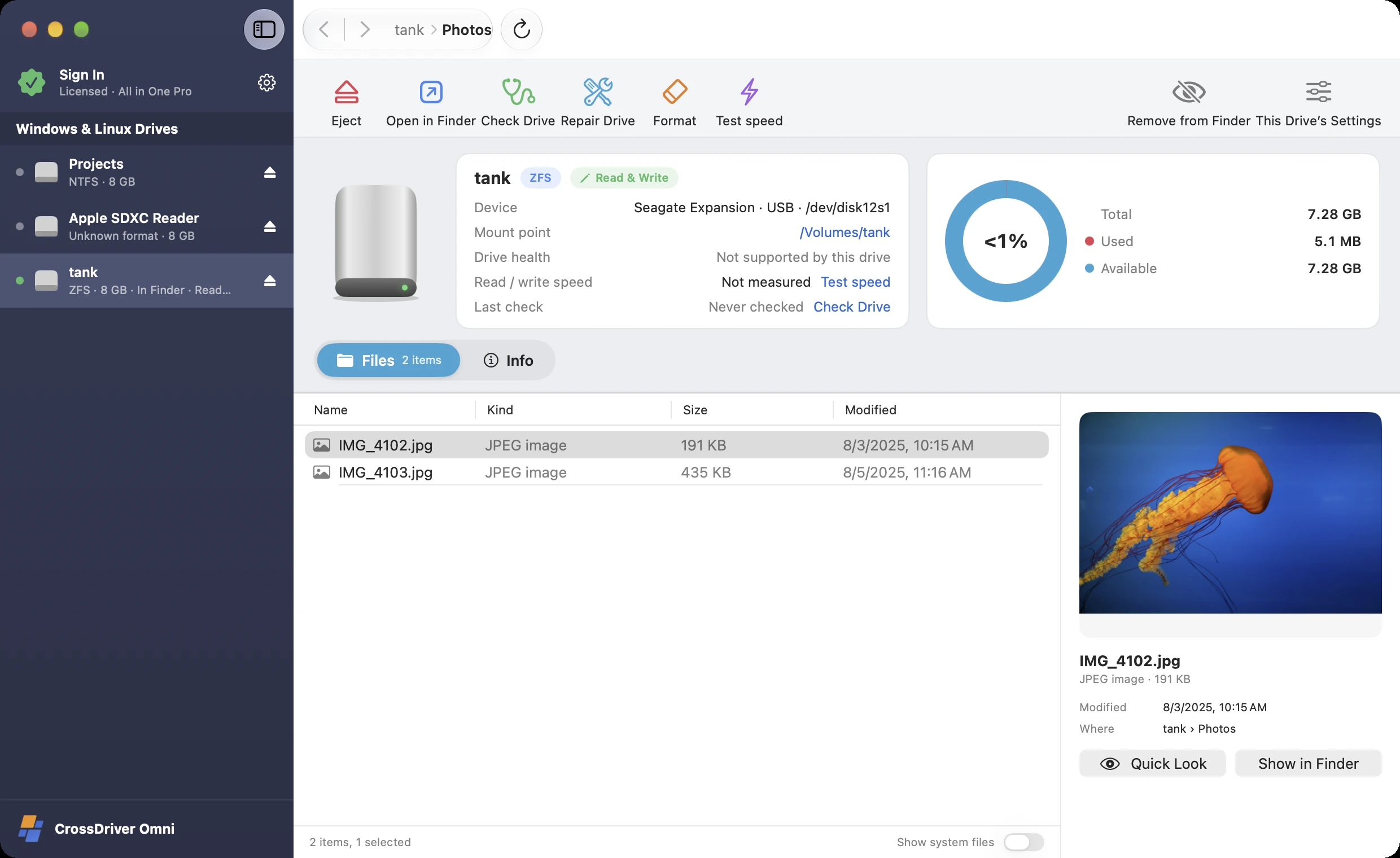
Choose by the disk you have
Every app is free to download, browse and preview with. NTFS, Ext4, XFS and All in One also include a free 7-day Pro trial.
CrossDriver NTFS
Read and write Windows external drives and USB flash drives directly on your Mac.
CrossDriver Ext4
Read and write Linux disks and Raspberry Pi memory cards directly on your Mac.
CrossDriver XFS
Read and write high-capacity XFS disks from servers and Unraid directly.

CrossDriver Omni
One app to read and write all common Windows and Linux disks.
CrossDriver NAS Rescue
NAS, external drive, or USB stick won't open or has bad sectors? Connect it to a Mac and recover files read-only.
CrossDriver Data Recovery
Deleted or formatted a USB stick, SD card, or external drive? Get your files back on a Mac.
Several times faster than traditional user-space tools, close to kernel speed
Ext4 as an example: the same USB 3.2 SSD, read and written three ways. See the Performance page for NTFS and XFS results.
Test setup (illustrative, TBD): MacBook Pro (M3 Pro, macOS 15), Samsung T7 Shield 1 TB (USB 3.2 Gen 2). Sequential read/write uses a single 10 GB file; the small-file test uses 10,000 files of 100 KB each. Each test is run 5 times and the median is reported, with caches cleared beforehand.
View data table
| Formats | Metric | Traditional user-space tools | CrossDriver New Generation | CrossDriver Kernel Edition |
|---|---|---|---|---|
| Ext4 | Sequential read (MB/s) | 380 | 900 | 980 |
| Ext4 | Sequential write (MB/s) | 150 | 820 | 920 |
| Ext4 | Small-file writes (files/s) | 120 | 1,050 | 1,300 |
Which one should I choose?
Only use one format? Get that edition. Run into several? Get All in One. NAS died? Get NAS Rescue. Deleted or formatted a USB stick or SD card? Get Data Recovery.
| NTFS | Ext4 | XFS | All in One | NAS Rescue | Data Recovery | |
|---|---|---|---|---|---|---|
| Read & write NTFS (Windows) | ✓ | — | — | ✓ | — | — |
| Read & write Ext2 / Ext3 / Ext4 | — | ✓ | — | ✓ | Read-only | — |
| Read & write XFS | — | — | ✓ | ✓ | Read-only | — |
| Read & write Btrfs, F2FS | — | — | — | ✓ | Btrfs read-only | — |
| Read & write ZFS | — | — | — | ✓ | Read-only | — |
| Format | NTFS | Ext4 | XFS | NTFS · Ext4 · XFS · Btrfs · ZFS · F2FS | — | — |
| Check & repair file systems | ✓ | ✓ | ✓ | ✓ | Diagnostics · btrfs restore | Diagnostics |
| Unlock encrypted disks | BitLocker | LUKS | LUKS | BitLocker · LUKS · ZFS | LUKS · BitLocker · ZFS | LUKS · BitLocker |
| Recover deleted & formatted files | — | — | — | — | ✓ | ✓ |
| Recover lost partitions | — | — | — | — | ✓ | ✓ |
| Rebuild NAS RAID / LVM / ZFS | — | — | — | — | ✓ | — |
| Image failing disks, verified recovery | — | — | — | — | ✓ | ✓ |
| Writes to your disk | Read & write | Read & write | Read & write | Read & write | Strictly read-only | Strictly read-only |
Every edition's free version lets you browse and preview files. The free versions of NTFS, Ext4, XFS and All in One also give read-only access in Finder, and Pro comes with a free 7-day trial.
Which Macs and disks are supported
Supported Macs
- Models
- MacBook Air, MacBook Pro, iMac, Mac mini, Mac Studio, Mac Pro
- Chip
- Apple silicon (the entire M1–M6 families, including Pro, Max and Ultra) and Intel processors
- System
- macOS 12 Monterey, 13 Ventura, 14 Sonoma, 15 Sequoia, 26 Tahoe and later
Supported disks
- Type
- External hard drives, portable SSDs, USB flash drives, SD / microSD cards, SATA / NVMe drives in an enclosure or dock, and drives pulled from a NAS
- Connection
- USB-A, USB-C, Thunderbolt, card readers, drive enclosures, drive docks
- Brands
- Works with every brand, such as Seagate, WD (Western Digital), Toshiba, Samsung T7 / T9, SanDisk, Kingston, Lexar, LaCie, UGREEN, ORICO and more
Common uses
- Windows external drives
- Moving files between Windows PCs at work and at home
- Linux & Raspberry Pi
- Raspberry Pi SD cards, drives from Linux PCs and servers
- Video & large files
- Editing media drives, camera and drone footage backups
- NAS failure
- Synology, QNAP or other NAS died? Pull the drives and get your files back
Whether a disk opens depends only on its format, not on brand or capacity.
No kernel extensions.
No changes to your Mac's security settings.
The new CrossDriver reads and writes NTFS, Ext4, XFS and other disks with native Linux file system drivers, running inside an isolated, lightweight Linux environment. Your Mac stays at its factory security level.
Works right after install
No Recovery mode, no lowering security, no restart — and no broken drivers after a macOS update.
A dedicated engine for your disk
The engine only sees the disk you open, fully isolated from macOS and your other disks.
Everything's written before you unplug
When you click "Eject", the engine writes all changes back to the disk before releasing it, so unplugging won't lose data.
All editions require macOS 12 or later and run natively on Apple silicon and Intel.
Already using CrossDriver Classic?
Classic is the kernel edition — both generations remain available
The Classic editions on crossdriver.com — NTFS For Mac, Ext4 For MAC and XFS For MAC — run as kernel extensions and are the fastest, but require lowering system security on Apple silicon Macs. The new generation is built on an all-new virtualization engine: no kernel extension, near-kernel speed, plus free preview, repair, formatting and encrypted-disk unlocking. Both share the same license and work on the same Mac. Want maximum speed? Choose Classic. Want hassle-free? Choose the new generation.
Common problems, solved step by step
Mac can't write to an NTFS external drive
Can't drag files onto your external drive? Why Mac can't write to NTFS, and how to fix it.
Mac external drive is read-only
External drive is read-only, showing "You can only read"? Five causes to check, one by one.
Free ways to read and write NTFS on Mac, compared
Free ways to read and write NTFS on Mac, compared.
Read and write NTFS on M1–M6 Macs (no kernel extension)
Read and write NTFS on M1–M6 Macs, no kernel extension needed.
How to open Ext4, XFS, and other Linux drives on Mac
Open Ext4, XFS, Btrfs and other Linux drives on Mac.
Read Synology NAS drives on a Mac
Synology NAS died? Pull the drives and read the data on your Mac.
Q&A
Which one should I download?
It depends on the disk’s format: external drives and USB flash drives used with Windows are usually NTFS; Linux and Raspberry Pi usually use Ext4; servers and Unraid often use XFS. Not sure? Choose All in One — it opens them all. NAS won’t boot? Choose NAS Rescue. Deleted files or formatted a disk by mistake? Choose Data Recovery.
What can the free version do?
The free version of every app can detect and open disks, browse all folders, and preview photos, videos and documents — with no time limit. The free versions of NTFS, Ext4, XFS and All in One also show the disk in Finder as read-only, and you can try Pro free for 7 days.
Why can't my Mac copy files to my external drive?
Most likely because the drive uses NTFS, the format Windows commonly uses: macOS can read NTFS but can't write to it, so in Finder you can't drag files in, delete or rename. Install CrossDriver NTFS to write directly in Finder. For the causes and other fixes, see Mac can't write to an NTFS external drive? Here's what to do.
Can I read drives pulled from a Synology or QNAP NAS on my Mac?
Not by simply plugging them in: NAS data usually sits on top of RAID / SHR and LVM, and macOS will say "The disk you attached was not readable by this computer." Click "Ignore" — don't initialize it. Connect all the drives from the same storage pool and use NAS Rescue to rebuild the array read-only, then browse and preview for free. For the steps, see Reading Synology drives on a Mac.
Which Macs are supported? Does it work on a MacBook Air or an M4 Mac mini?
Every Mac that runs macOS 12 or later is supported: MacBook Air, MacBook Pro, iMac, Mac mini, Mac Studio and Mac Pro. Apple silicon (the entire M1–M6 families, including Pro, Max and Ultra) and Intel processors are supported natively, on macOS 12 Monterey, 13 Ventura, 14 Sonoma, 15 Sequoia, 26 Tahoe and later.
Does it work on M1–M6 Macs? Do I need to disable SIP or install a kernel extension?
Yes, it works — and no, you don't. CrossDriver runs natively on Apple silicon Macs such as M1–M6 as well as Intel Macs, on macOS 12 Monterey, 13 Ventura, 14 Sonoma, 15 Sequoia, 26 Tahoe and later. It uses macOS's built-in virtualization framework to run an isolated, lightweight engine that reads and writes your disks — no kernel extension, no disabling SIP, no changes to any security settings, and no restart after installing.
Can I try Pro first?
Yes. CrossDriver NTFS, Ext4, XFS and All in One all offer a free 7-day Pro trial in the app — once per Mac, no payment details required. After the trial ends, your disks remain accessible read-only and your files are unaffected.
Plug in your disk and take a look — free
Every edition is free to download and preview.
Choose an edition and download